Solution Builders team

Jump to a section
- Technology friction costs the average worker 7.9 hours a week, 51 working days a year, and the number rose 42% in one year.
- Multiply hours lost by headcount, loaded hourly cost and 52 weeks. For a 50 person team the illustrative figure passes $800,000 a year.
- Your IT team feels it too: 60% of IT professionals report burnout and 58% spend half the week on end user requests.
- Proactive managed IT support swaps the break fix treadmill for monitoring, maintenance and a 5 minute help desk, for the cost of one technician.
Where the hours go: almost a full day a week, gone
Picture a Tuesday morning at a 60 person firm in downtown Minneapolis. One laptop will not join the Wi-Fi. Two people are locked out of Microsoft 365. Nobody logs a ticket, because none of it feels big enough to log. It just quietly eats the morning. If you have ever searched for managed IT support in Minneapolis at 9:15 on a day like that, you know the feeling.
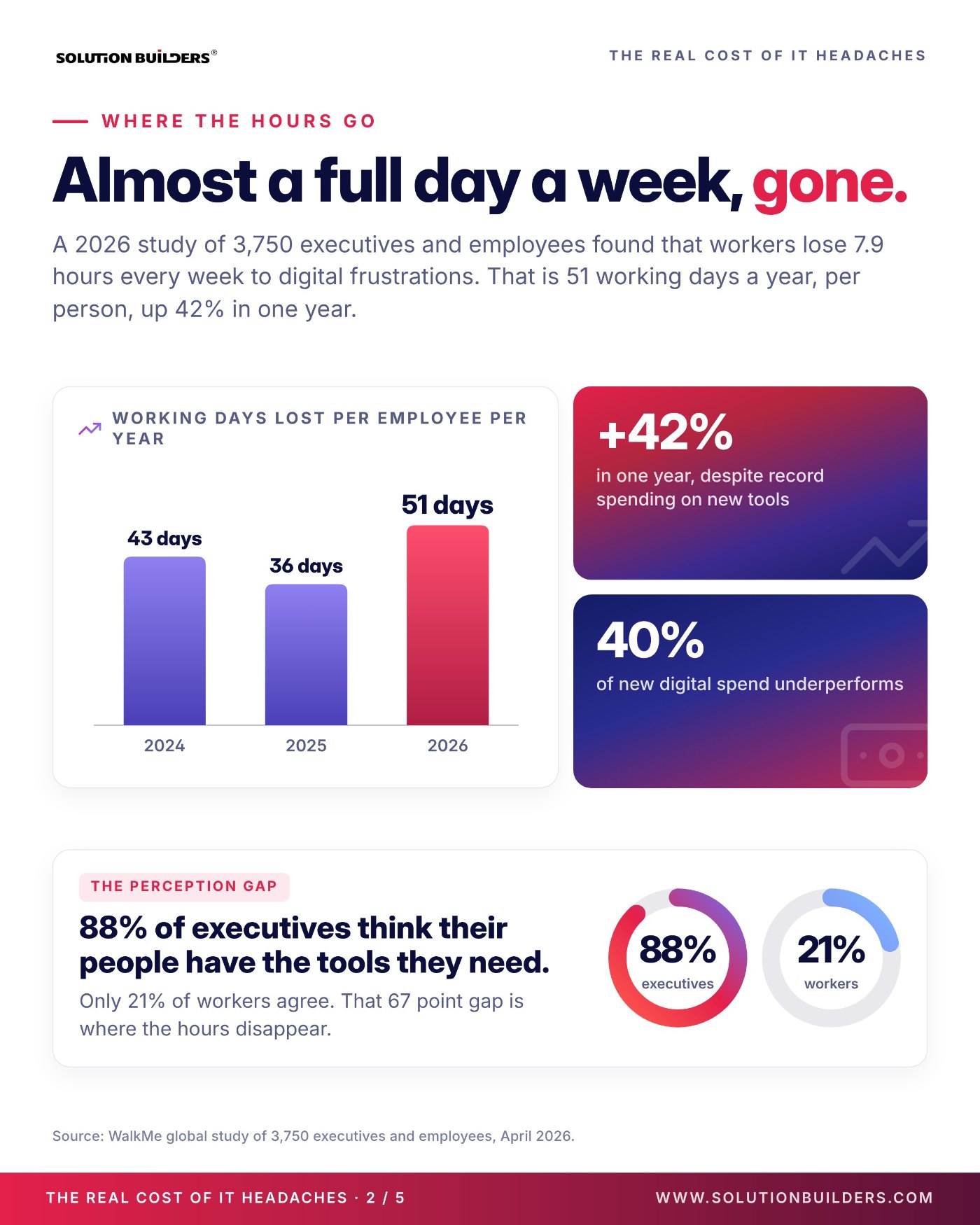
The quiet is the expensive part. A 2026 WalkMe study of 3,750 executives and employees found that workers lose 7.9 hours every week to digital friction, the small failures and workarounds between a person and the task. That is 51 working days a year per person, up 42% from the 36 days the same study found a year earlier. Record spending on new tools has not helped: 40% of new digital spend underperforms.
One more number for the leadership agenda: 88% of executives in the WalkMe data believe their people have the tools they need. Only 21% of workers agree. That 67 point gap is where the hours disappear, and companies with 25 to 500 employees are often surprised when they finally measure it.
What IT friction costs your business, in four steps
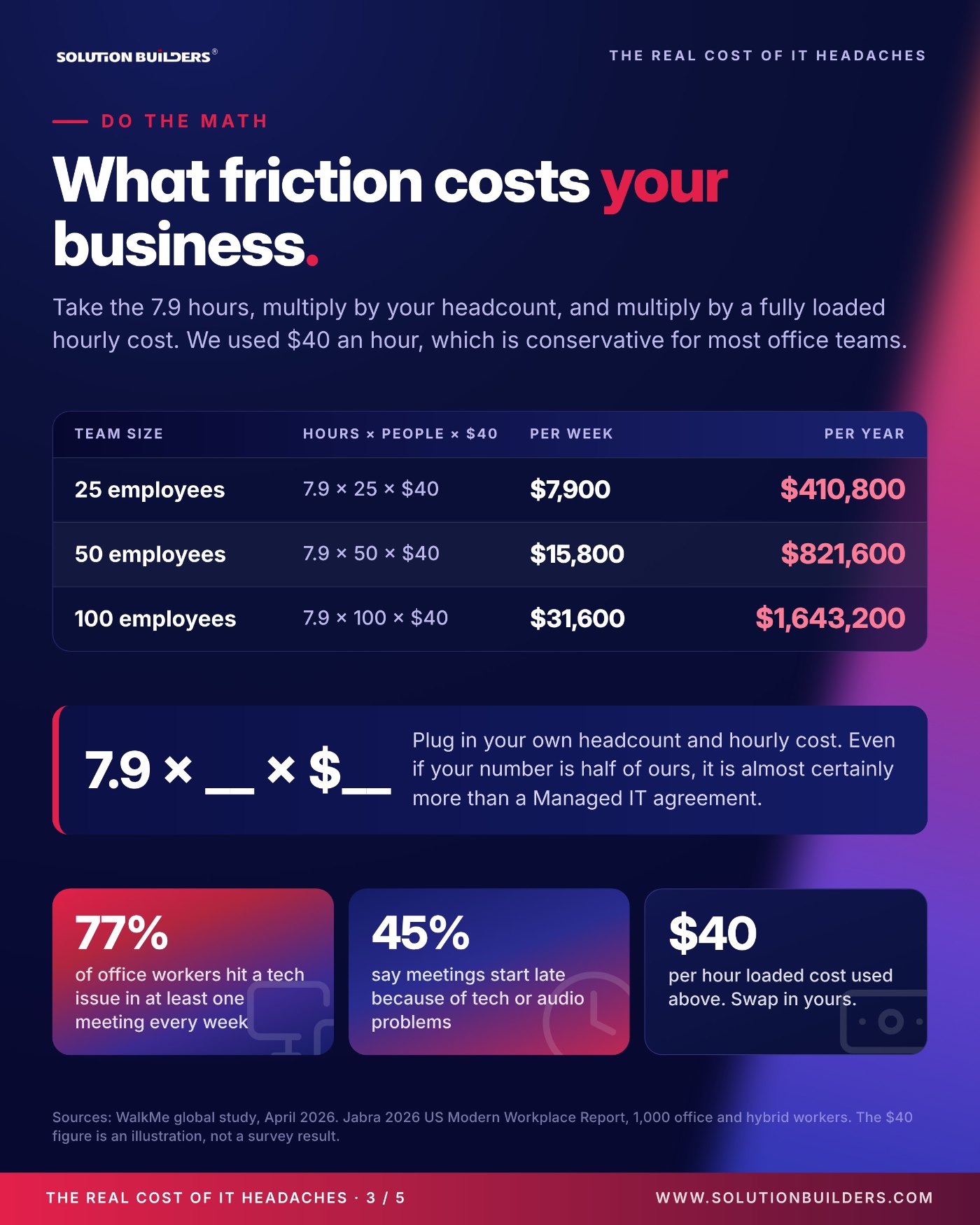
You do not need a consultant to estimate the cost of IT downtime for a small business. You need four numbers and a calculator. The estimate is deliberately simple and undercounts, since it ignores the client who waited and the invoice that went out late.
- Start with hours lost per weekUse 7.9 from the WalkMe study, or log your own interruptions for two weeks and use that.
- Multiply by headcountEveryone who touches a computer counts, including the plant floor and the front desk.
- Multiply by a fully loaded hourly costSalary plus benefits plus overhead, divided by hours worked. We use $40 as a conservative placeholder. Swap in yours.
- Multiply by 52 weeksThe same math the infographic uses. Trim it to 48 if you want to allow for vacation and holidays; the conclusion does not change.
| Team size (illustrative) | Hours × people × $40 | Per week | Per year, 52 weeks |
|---|---|---|---|
| 25 employees | 7.9 × 25 × $40 | $7,900 | $410,800 |
| 50 employees | 7.9 × 50 × $40 | $15,800 | $821,600 |
| 100 employees | 7.9 × 100 × $40 | $31,600 | $1,643,200 |
These figures are illustrative, not a survey result, and your inputs will differ. Even if your number is half of ours, it is almost certainly more than a managed IT agreement costs. The friction has company, too: Jabra's 2026 US Modern Workplace Report found that 77% of office workers hit a technology issue in at least one meeting every week. Run it once with your real headcount and bring it to the next leadership meeting.
The other side of the ticket: your IT team is drowning too
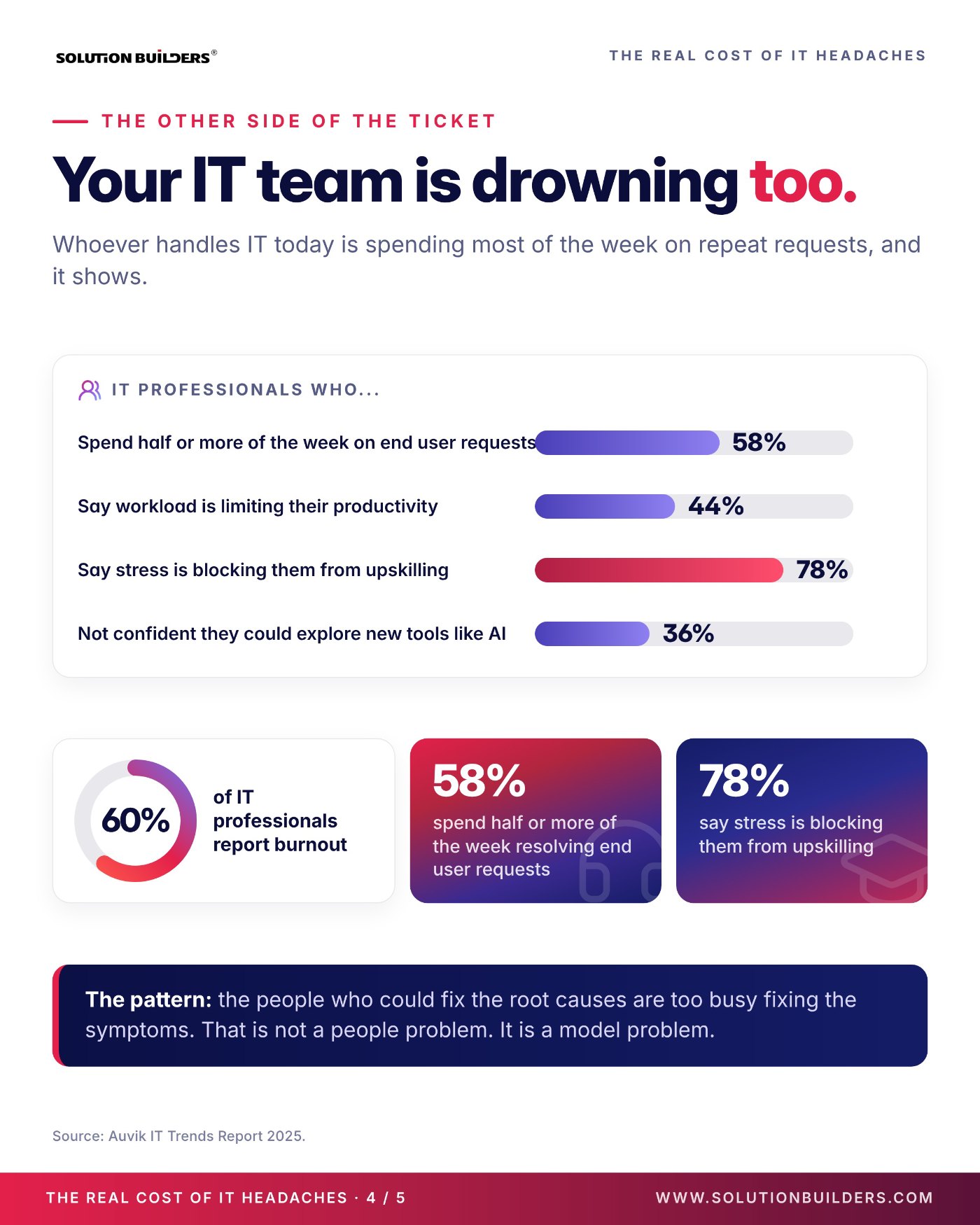
Whoever handles IT at your company today, a two person team, one overworked administrator or the office manager who is "good with computers", is spending most of the week on the same repeat requests. The Auvik IT Trends Report 2025 puts numbers on it.
- 60% of IT professionals report burnout. Not stress. Burnout, the kind that ends in a resignation letter.
- 58% spend half or more of the week on end user requests. Password resets, printer queues and "my screen looks weird".
- 78% say stress is blocking them from upskilling. The security certification keeps getting pushed to next quarter.
- 44% say workload is limiting their productivity, and 36% are not confident they could explore new tools like AI.
It is not a people problem. It is a model problem.
The people who could fix the root causes are too busy fixing the symptoms. Patching slips, so more things break, so more tickets arrive, so patching slips further. One more technician does not break that loop. Changing who handles the repeat work does.
This is where an IT director in Minneapolis or St. Paul asks whether outside help means giving up control. It does not. Co-Managed IT moves the tier 1 queue, after hours coverage and patching to a 50+ engineer team while your people keep strategy, priorities and the final say on every change. Companies without an internal team get the same engine with Solution Builders running all of it.
Managed IT support in Minneapolis: proactive IT maintenance beats break fix
Most IT headaches are not random. They are the visible end of maintenance that did not happen: the patch never applied, the aging switch nobody replaced, the backup job failing quietly since March. Reactive support waits for the symptom; proactive IT maintenance removes the cause before anyone in your office knows it existed.
Reactive support
- Something breaks, someone calls, the clock starts
- Billed by the hour, so your bad day is the vendor's good day
- Patching happens when there is time
- Nobody owns the roadmap
Proactive maintenance
- Monitoring catches the failing drive on Tuesday, not the outage on Friday
- Fixed monthly fee, so fewer tickets is the shared goal
- Patching, updates and backup checks on a schedule
- A named Client Relationship Manager owns the roadmap
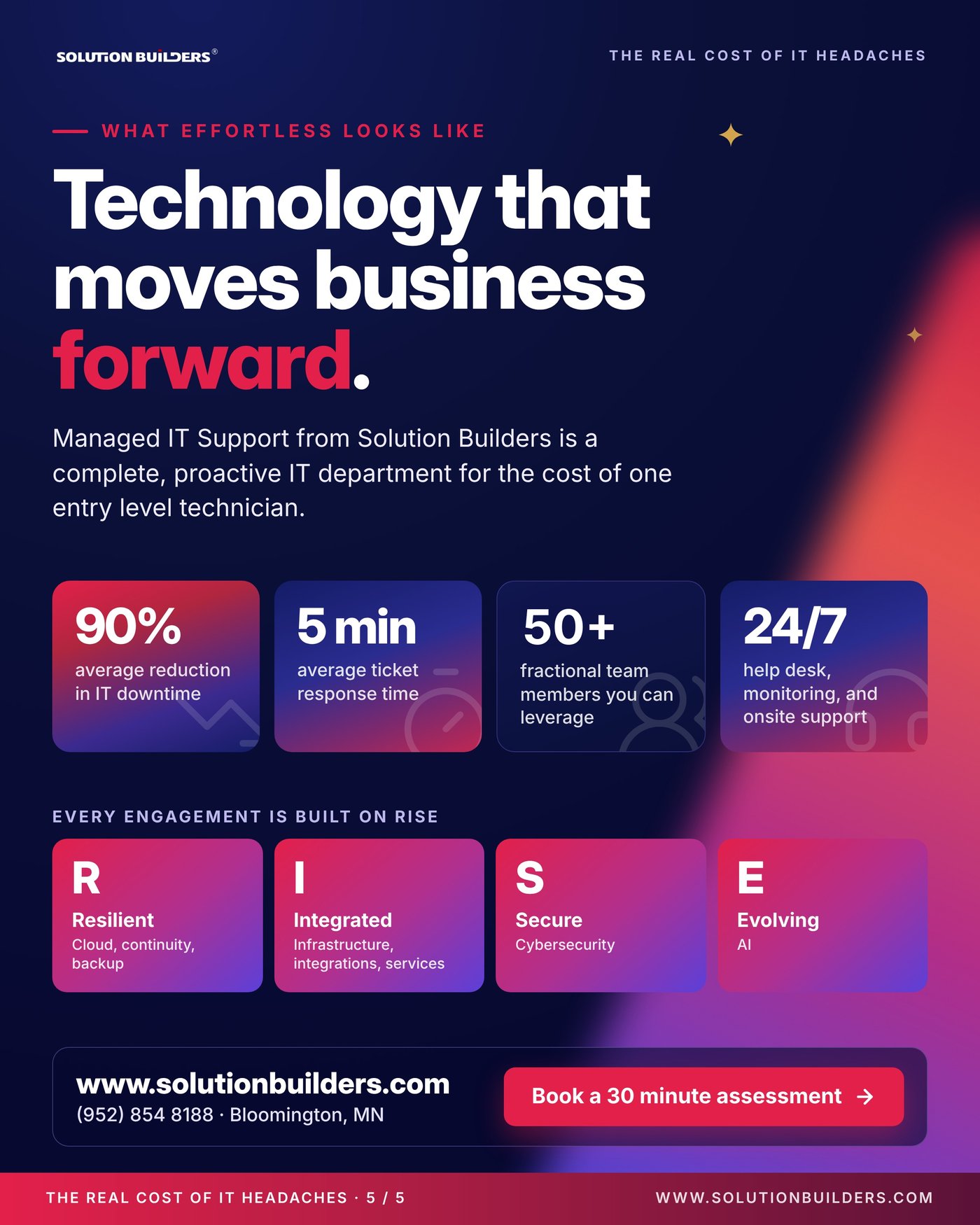
From Solution Builders that means a dedicated Client Relationship Manager, proactive maintenance on every device and server, a 24/7 IT help desk for your Twin Cities team with a 5 minute average response time, and 50+ engineers who fix things before your people notice, for about the cost of one entry level technician. Cybersecurity is built in, because an unpatched laptop is both a help desk ticket and an open door, and our process page shows how an engagement runs. One 85 user manufacturer off the I-494 corridor eliminated more than 100 hours of monthly downtime and cut support tickets 60% inside 90 days.
Three things to do before the next ticket
None of these require a purchase, and the first two take less than an hour.
- Run the four step estimate with your real headcount and loaded cost. Put the annual number on the budget.
- Ask whoever handles IT to log every interruption for two weeks, including the ones that never become tickets. Compare the total to 7.9 hours a week.
- Check three basics: the last patch cycle, the last successful restore test, and who gets the alert when a server fills up at 2 a.m.
- Read how a first 90 days with a new provider runs, week by week, in Your First 90 Days.
- Get an outside read. A 30 minute conversation with a Solution Builders engineer, from our Bloomington office next door to the Mall of America, gives you a candid picture of where the hours go and the three fixes with the biggest payback.
If the bigger question is budget and direction rather than tickets, our virtual CIO and IT consulting team can turn the estimate into a 12 month roadmap built on RISE: Resilient, Integrated, Secure and Evolving. Technology that moves business forward is what a Tuesday morning feels like when nothing is in the way.
Managed IT support for growing companies across the Twin Cities
Solution Builders has run IT for Minnesota businesses from Bloomington since 1995. Our 50+ engineers, 24/7 help desk and security operations center support companies with 25 to 500 employees in Minneapolis, St. Paul and across the metro, from manufacturers along the I-494 corridor to professional services firms in the North Loop, with month to month terms. Related services: Cybersecurity, Co-Managed IT, IT Consulting. Contact us or book a 30 minute call.