

Copilot, ready
for work.
Microsoft 365 Copilot can save your team real hours, but only if your data is governed and your people know how to use it. We handle readiness, permissions, secure rollout, and the adoption that makes it stick.
Copilot is only as safe as your permissions.
Copilot answers questions using whatever a user can already access. If your SharePoint and file permissions are loose, Copilot will happily surface things people were never meant to see. Solution Builders gets you Copilot ready first, tightening permissions and governing your data, then rolls it out securely and trains your team so the productivity is real and the risk is controlled.
- A readiness assessment before you license Copilot
- Permissions and data governance cleaned up first
- Secure rollout across Microsoft 365 apps
- Adoption training so people actually use it
Copilot exposes the permissions you ignored.
The number one Copilot risk isn't the AI, it's oversharing. Years of loose SharePoint permissions become instantly searchable the moment Copilot turns on. Fixing data governance first means Copilot accelerates work without exposing salaries, contracts, or confidential files. Readiness is the difference between a productivity win and an HR incident.

“Copilot can only surface what a user can already reach, so governance must come before rollout.”COPILOT READINESS
Copilot, across your whole workday.
Once your data is governed, Copilot plugs into the Microsoft 365 apps your team lives in, drafting, summarizing, and analyzing where the work already happens.
Readiness first · Data governance · Secure rollout · Real adoption
AI productivity, safely unlocked.
Governed access so a single misconfiguration can't expose the business.
Copilot working inside Word, Excel, Teams, and Outlook as one assistant.
Permissions cleaned up before rollout so Copilot never overshares.
A foundation that grows as Microsoft expands Copilot's capabilities.

From risky to ready.
Before Copilot goes live we find and fix oversharing, retire "everyone" links and apply sensitivity labels, because Copilot shows people everything they already technically can see.
A permissions audit and restricted search settings give you a clear map of what Copilot can reach, with sensitive sites fenced off.
A pilot group, role based prompt libraries and short training sessions turn licenses into daily habits, measured in hours saved.
A 30, 60 and 90 day adoption plan with champions and usage reporting keeps the rollout moving until the gains show up in the numbers.

We almost rolled out Copilot on top of a decade of messy permissions. Solution Builders caught it, cleaned up our data governance first, then deployed it. Now it saves our team hours a week, without exposing anything.DIRECTOR OF OPERATIONS, SERVICES FIRM
Copilot ready in weeks.
A typical Copilot engagement moves from readiness check to confident, governed adoption in about five weeks.

Copilot readiness and data exposure assessment.

Clean up permissions and sensitivity labeling.

License and roll out Copilot to a pilot group.

Hands on adoption training with real use cases.

Expand org wide with usage monitoring.
The Copilot Readiness Playbook.
How to roll out Microsoft 365 Copilot so it boosts productivity without exposing your data.
- Why permissions must be fixed first
- The oversharing risk, explained
- A Copilot readiness checklist
- Driving adoption that actually sticks
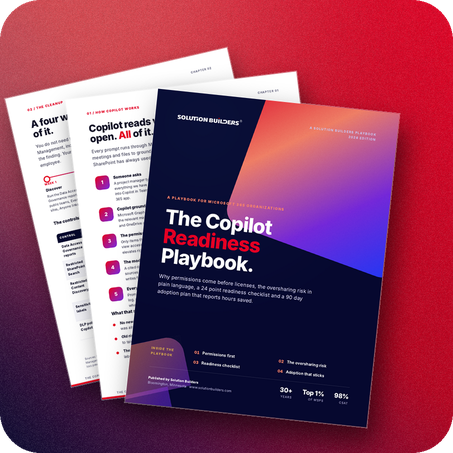
Microsoft Copilot, explained.
Straight answers to what leaders ask us most.
Unlock Copilot without the risk.
Book a no pressure call with our team. We'll assess your Copilot readiness and show you the safe path to real productivity.
- Free, no obligation consultation
- Straight answers from a real engineer
- We respond within one business day
Talk with Our Team
Tell us where you are with Copilot, we'll take it from there.
Your information is kept private and never shared
A member of our team will reach out within one business day.