Solution Builders team
Jump to a section
- Backups fail quietly: silent job errors, restores nobody tried, copies on the attacker's network and a Microsoft 365 tenant nobody backs up.
- Two numbers decide every recovery choice. RPO is how much work you lose, RTO is how long you wait. Set both per system with finance.
- Attackers go after backups first. One immutable, offsite copy under separate credentials turns a ransom note into a restore job.
- A 60 minute tabletop and one timed restore find the gaps. Score twelve items, fix the three worst, book the next test.
Business continuity and disaster recovery in Minnesota starts with failed backups
Nearly every company in the Twin Cities has backups. Far fewer have recovery. The difference shows up at the worst moment: a green dashboard, a confident vendor and a restore that stalls, comes back corrupt or turns out to be three weeks old. Business continuity and disaster recovery for a Minnesota company with 25 to 500 people is not a product you buy. It is the difference between owning copies and knowing they will come back.
A failed backup does not send up a flare. It sends an email to a mailbox nobody reads. These are the five failures our engineers find most often in recovery assessments, in the order we usually find them.
- Jobs that fail silently. A job errors out, retries, and the dashboard stays green. Weeks later the newest usable copy is a month old.
- Restores nobody has tried. Corrupt catalogs, missing encryption keys and the wrong drivers all hide until the first real attempt.
- Copies on the same network. If the backup server shares credentials with production, the attacker who encrypts production encrypts the backups ten minutes later.
- Microsoft 365 is not backed up. Microsoft keeps the service running. Retention windows and recycle bins are not backup, and they expire quietly.
- No copy outside the building. Fire, flood, a burst pipe in January and a bad firmware update do not care how many copies sit in the same rack.
Backup software reports whether a job ran, not whether the business could come back from it. Treat a green checkmark as the start of the question, not the answer. That mindset is the core of what we call being resilient by design, and it is the R in the RISE framework Solution Builders uses with every client.
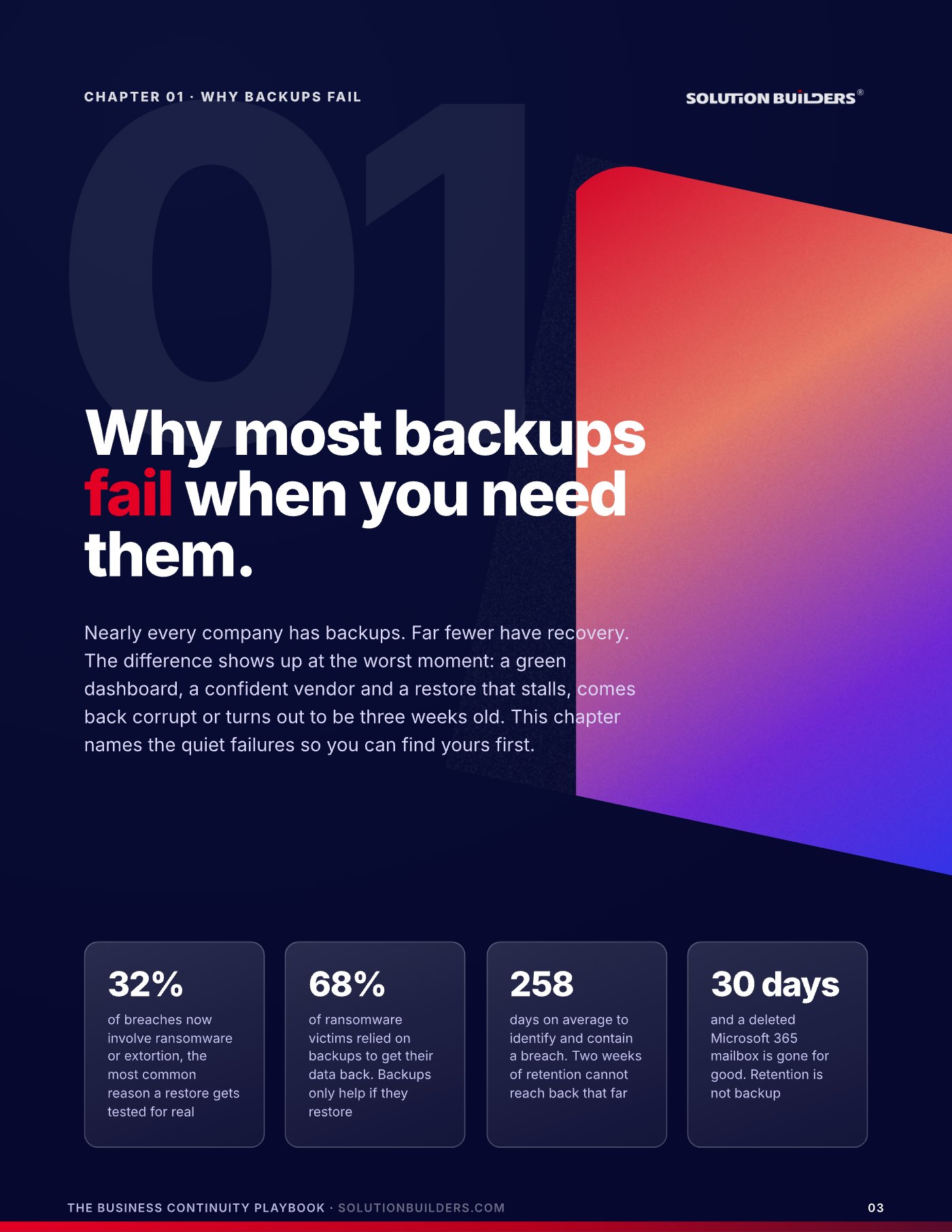
Backup is a product. Recovery is a practice
You can buy backup in an afternoon. Recovery is something your team does on a schedule. The gap between the two is visible in five questions, and you can ask them of your IT team or provider this week. A fail is not a crisis. It is a to do list.
What usually exists
- Jobs run nightly. Nobody reads the alerts.
- Copies sit on a NAS in the server room.
- The cloud covers Microsoft 365, surely.
- The last restore test was the install day.
What should exist
- Every failed job becomes a ticket.
- One copy is offsite. One cannot be deleted.
- Microsoft 365 has its own backup platform.
- A timed restore every quarter, on file.
| Ask | Fail looks like | Pass looks like |
|---|---|---|
| Did last night's jobs run? | Nobody is sure | A ticket opens on every failure |
| When did we last restore a server? | "We have never needed to" | Within 90 days, timed |
| Can one admin delete every copy? | Yes, from one console | No, one copy is immutable |
| Is Microsoft 365 backed up? | "It is in the cloud" | Mail, files and Teams, daily |
| Where is the offsite copy? | Same building or host | Other region, own credentials |
If you fail a row, pull 30 days of job logs and count the failures, book a restore test for one server and one mailbox, and ask your provider to show you the immutable copy on screen rather than describe it. Then write down who can run a restore and where the runbook lives. One name is a gap. This audit is the first thing our data backup services team in Minneapolis runs with a new client, and most companies fail two or three rows the first time. An untimed restore is an unkept promise.
RTO and RPO explained: how much you lose, how long you wait
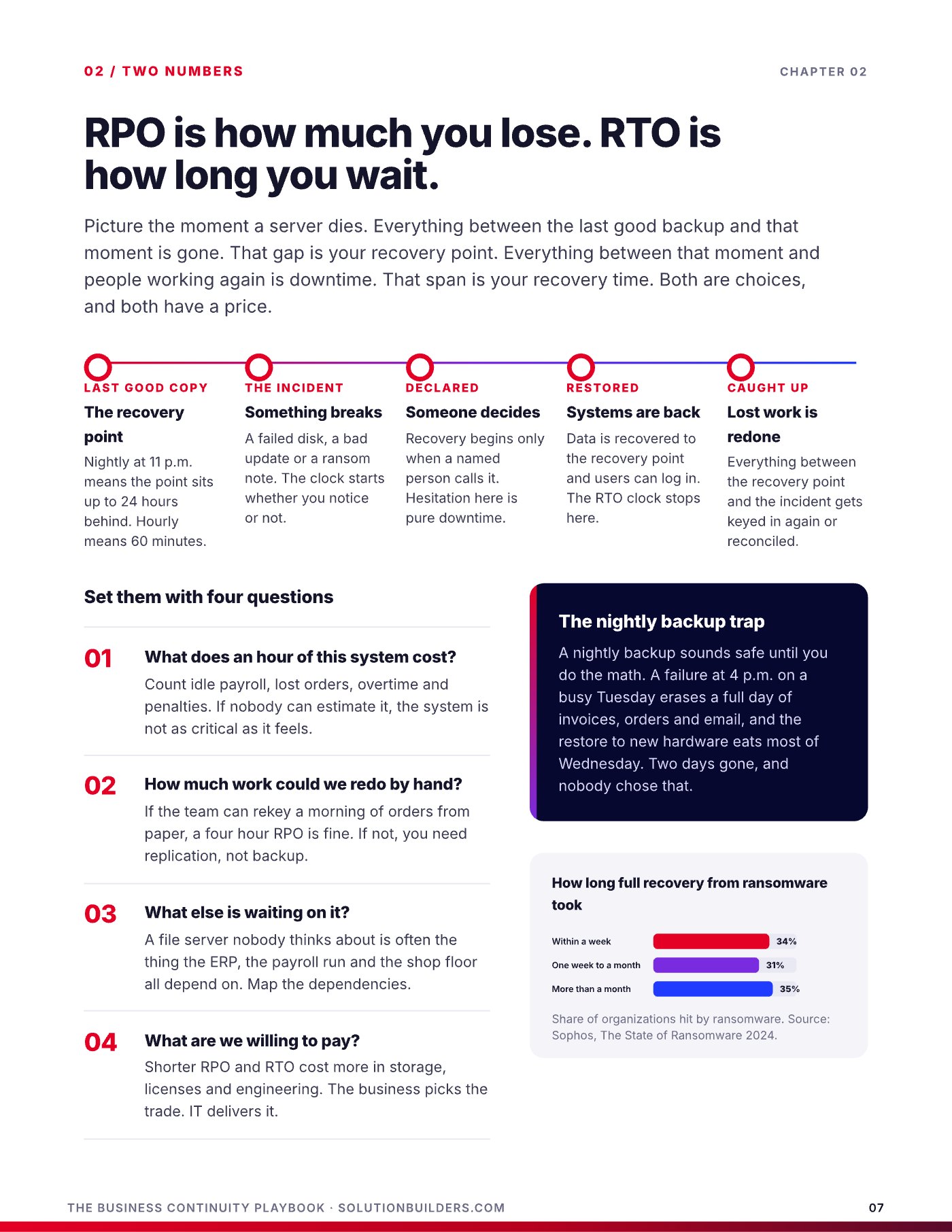
Recovery planning has exactly two numbers that matter, and most companies have never written either one down. Here is RTO and RPO explained in one picture. Picture the moment a server dies. Everything between the last good backup and that moment is gone. That gap is your recovery point objective, your RPO. Everything between that moment and people working again is downtime. That span is your recovery time objective, your RTO. Both are choices, and both have a price.
- Last good copyNightly at 11 p.m. means the recovery point sits up to 24 hours behind. Hourly means 60 minutes. Whatever the schedule says is your real RPO, whether you chose it or not.
- The incidentA failed disk, a bad update or a ransom note. The clock starts whether you notice or not.
- DeclaredRecovery begins only when a named person calls it. Hesitation here is pure downtime.
- RestoredData is recovered to the recovery point and users can log in. The RTO clock stops here.
- Caught upEverything between the recovery point and the incident gets keyed in again or reconciled by hand.
Set the two numbers with four questions per system. What does an hour of this system cost, counting idle payroll, lost orders and penalties? How much work could we redo by hand? What else is waiting on it? And what are we willing to pay, since shorter targets cost more in storage, licenses and engineering? The business picks the trade. IT delivers it. The Uptime Institute's 2024 outage analysis found 54% of organizations said their most recent serious outage cost more than $100,000, which usually ends the argument.
Two days gone, and nobody chose that
A nightly backup sounds safe until you do the math. A failure at 4 p.m. on a busy Tuesday erases a full day of invoices, orders and email, and the restore to new hardware eats most of Wednesday. Sophos found that 35% of ransomware victims needed more than a month to fully recover.
Not every system deserves a one hour recovery
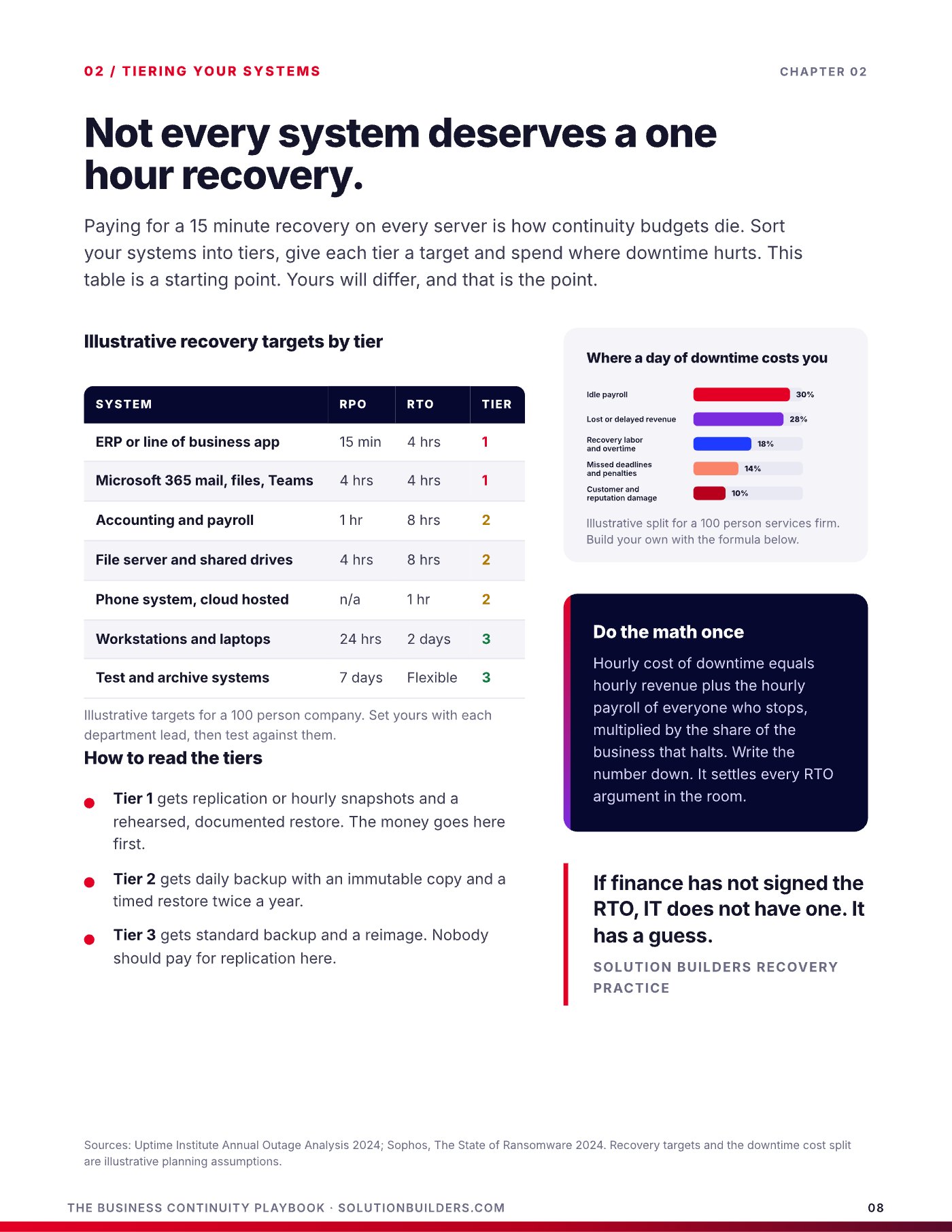
Paying for a 15 minute recovery on every server is how continuity budgets die. Sort your systems into tiers, give each tier a target and spend where downtime hurts. The targets below are a starting point for a 100 person company. Yours will differ, and that is the point. Set them with each department lead, then test against them.
| System | RPO | RTO | Tier |
|---|---|---|---|
| ERP or line of business app | 15 min | 4 hrs | 1 |
| Microsoft 365 mail, files, Teams | 4 hrs | 4 hrs | 1 |
| Accounting and payroll | 1 hr | 8 hrs | 2 |
| File server and shared drives | 4 hrs | 8 hrs | 2 |
| Phone system, cloud hosted | n/a | 1 hr | 2 |
| Workstations and laptops | 24 hrs | 2 days | 3 |
Tier 1 gets replication or hourly snapshots and a rehearsed, documented restore. The money goes here first. Tier 2 gets daily backup with an immutable copy and a timed restore twice a year. Tier 3 gets standard backup and a reimage, and nobody should pay for replication here. Notice that a cloud hosted phone system has no recovery point at all, because there is nothing to restore. Moving workloads out of the server room changes the tier math, which is one of the quieter arguments for a cloud migration done on purpose rather than on a deadline.
Do the math once. Hourly cost of downtime equals hourly revenue plus the hourly payroll of everyone who stops, multiplied by the share of the business that halts. Write the number down. It settles every RTO argument in the room.
If finance has not signed the RTO, IT does not have one. It has a guess.Solution Builders Recovery Practice
Beating ransomware with one copy nobody can touch
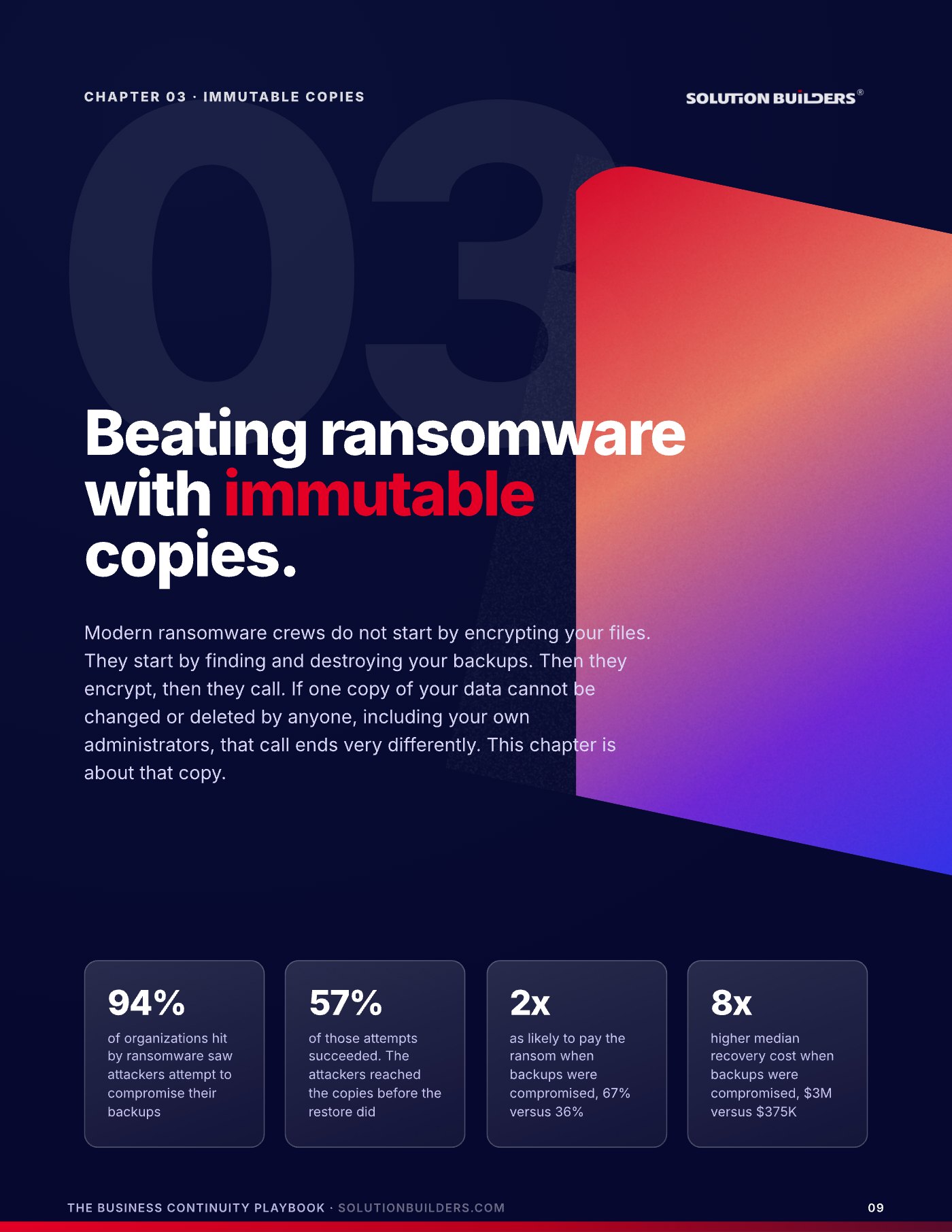
Modern ransomware crews do not start by encrypting your files. They start by finding and destroying your backups. Then they encrypt, then they call. The sequence is predictable: a phished login on day zero, five quiet days of looking for the backup console, cloud copies purged with your own credentials on day six, production encrypted early on a weekend morning on day seven. With no clean copy, the choice on day eight is pay or rebuild from nothing. With one, you restore.
The classic rule is three copies, two media, one offsite. Add one more number and a zero, and it holds up against a ransomware crew.
- Three copies: production plus two backups, so one mistake never leaves you with zero.
- Two different media: local disk plus cloud object storage, so they fail differently.
- One offsite: another building, region or cloud. Fire and flood do not care how many copies share a room.
- One immutable: a copy nobody can alter or delete for a fixed period, your own admins included.
- Zero errors: a verified, tested restore. A copy nobody has restored does not count.
Immutable means object lock in cloud storage or a hardened repository that accepts new data and refuses deletes until a timer expires. Not a password. Not a permission. A property of the storage itself. Give backup its own admin identity with hardware MFA, lock the offsite copy for 30 days minimum, and keep monthly recovery points for a year so a clean copy predates the intruder. Ransomware recovery in the Twin Cities looks very different when the attacker cannot reach your copies: a 42 user accounting firm we support contained a live attack in 22 minutes, paid no ransom and recovered 100% of its data, because 24/7 detection and an untouchable copy were designed together.
A disaster recovery test you can run this week
You do not need a weekend, a consultant or a second data center to test recovery. You need 90 minutes, four people in a room and one restore that actually runs. A tabletop is a conversation with a clock. The executive sponsor reads a scenario aloud and the room says what it would do and who would do it. Then you leave the room and restore something, because talking is not the test.
The script: "It is Friday at 4 p.m. Payroll runs Monday. The file server and the ERP are encrypted. The note asks for $400,000 in 72 hours. The backup console is not responding." Put the contact list on paper, assume email, Teams and the phone system are down, and give someone the job of scribe. Every "we would probably" is a gap.
- 0:00, set the sceneThe sponsor reads the scenario. Who notices, who declares, who gets called.
- 0:30, the decisionsPay or restore. Which systems come back first. What we tell customers, and who says it.
- 0:50, the recoveryWalk the restore order against the tier table. Where is the runbook, and who holds the keys?
- 1:00, the real restoreLeave the room. Restore one server and one mailbox from the offsite copy to an isolated target. Time it.
Score twelve items afterward, six on detection and decisions, six on recovery and proof: an alert reached a named person within 15 minutes after hours, one person had authority to declare, the contact list worked, the RPO was known, the restore ran from the offsite copy, the server came back inside its RTO, the mailbox came back with permissions intact, two people could have run it from the runbook, and every gap got an owner and a date.
| Score | Where you stand | Next move |
|---|---|---|
| 0 to 4 | Exposed. A real incident becomes a rebuild. | Start with the immutable copy |
| 5 to 8 | Typical. You would recover, slowly and at a price. | Fix the three worst gaps, retest in 90 days |
| 9 to 12 | Ready. | Quarterly restores, then test a full site failure |
What to do this week
Three moves, in order. Together they are the start of a backup and disaster recovery plan for a small business that would survive contact with a real Friday.
- Run the five minute auditAsk the five questions of whoever runs your backups. Count the fails. Book a restore test for one server and one mailbox before the meeting ends.
- Write down two numbers per systemRPO and RTO for the ERP, Microsoft 365, accounting and the file server, agreed with the department lead and signed by finance.
- Get an outside readA Recovery Readiness Snapshot with Solution Builders is a free 30 minute conversation: a candid read on your backups, your real RTO and the three gaps to close first. Book a time or call (952) 854 8188.
One test is a snapshot. Four a year is a program. Book the next one before you leave the room, rotate the scenario and keep every scorecard. Trend lines are what convince boards and insurers, and they are what turn a company that has outages into a company that has stories about them.
Business continuity for growing companies across the Twin Cities
Solution Builders has kept Minnesota businesses running from Bloomington since 1995. Our continuity practice, 50+ engineers and 24/7 security operations center support companies with 25 to 500 people in Minneapolis, St. Paul and across the metro, including manufacturers with a plant in Greater Minnesota and an office off I-494. Related services: Data Backup and Disaster Recovery, Cybersecurity, Cloud Migration, Microsoft 365. Contact us or book a 30 minute call.