Solution Builders team

Jump to a section
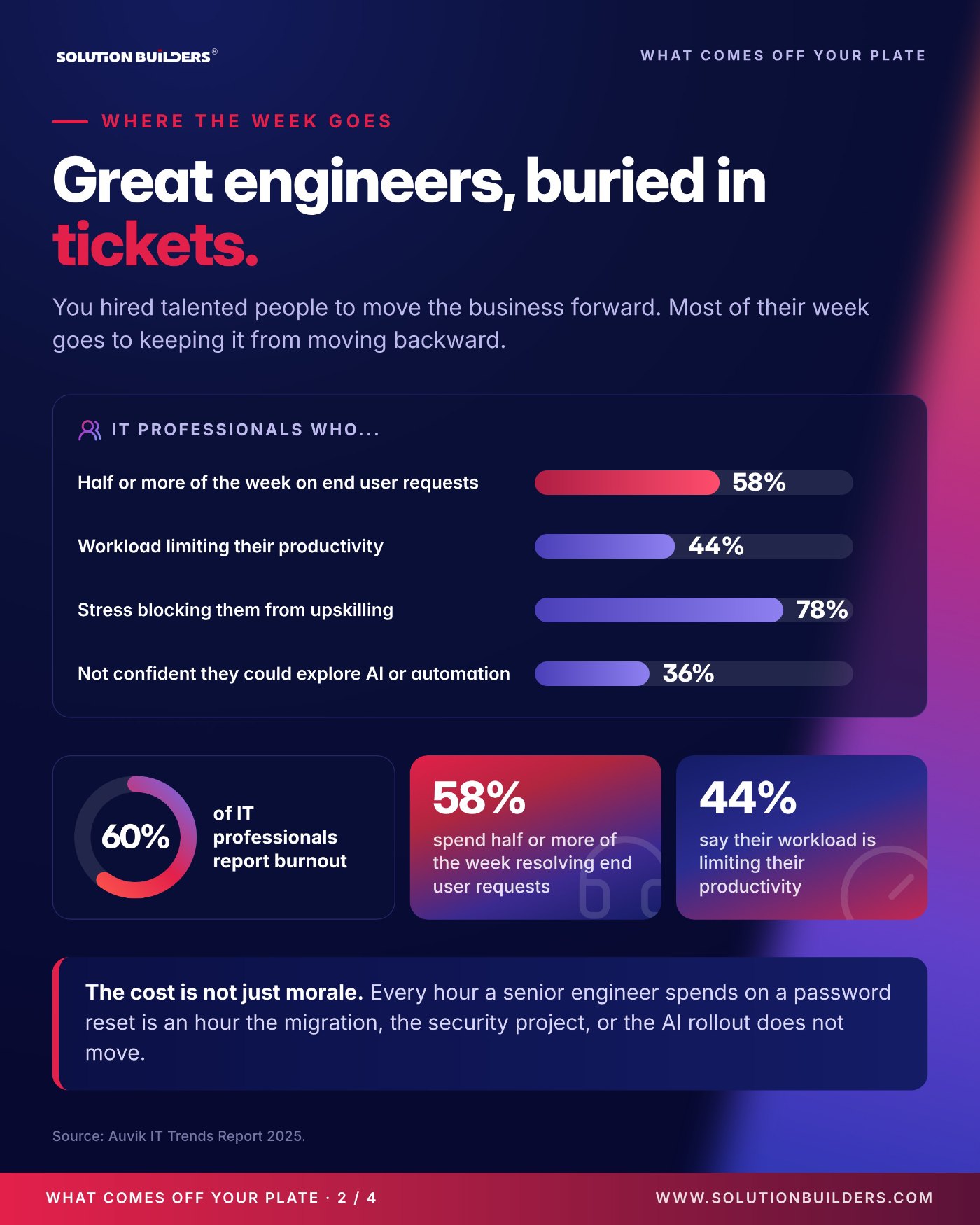
- IT team burnout is measurable: 60% of IT professionals report it, and 58% spend half or more of the week on end user requests.
- Off your plate: tier 1 tickets, after hours coverage, patching, backup testing, 24/7 security operations, vendor escalations and stalled projects.
- Stays with you: strategy, budget, business relationships, the final say on every tool and vendor, and the work only your team can do.
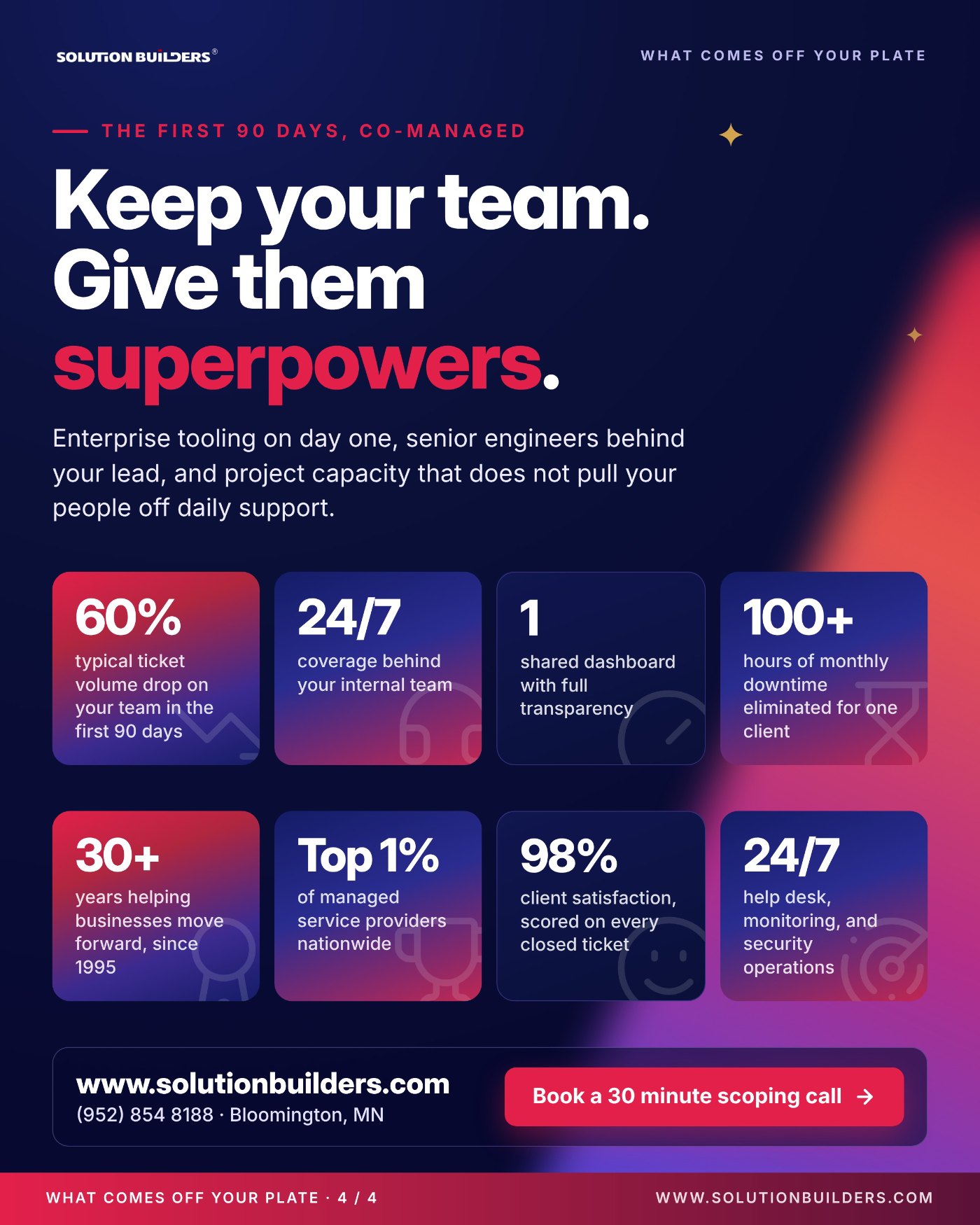
- Typical result in the first 90 days: ticket volume on your internal team drops about 60%, with one shared dashboard for full visibility.
Great engineers, buried in tickets
Picture an IT director in Minneapolis with a team of three supporting 180 people across a Twin Cities office and a plant an hour north. The Microsoft 365 cleanup has been "next quarter" for three quarters. And every morning starts the same way: a locked account, a printer, a laptop that will not join the Wi-Fi. This is the moment most IT leaders start looking at a co-managed IT help desk in Minnesota, and the moment the worry about losing control shows up with it.
The IT team burnout statistics in the Auvik IT Trends Report 2025 say this is the norm, not the exception.
Every hour on a password reset is an hour the project does not move
When a senior engineer spends the week on tier 1 tickets, the migration, the security project and the AI rollout all wait. The company pays a senior salary for junior work, and the roadmap stays a roadmap. That is a model problem, and it has a model fix.
Companies with 25 to 500 employees rarely get approval to double the IT team. What they can get is depth behind the people they already have: a 50+ engineer bench, enterprise tooling from day one, and someone else answering the phone at 2 a.m. in January.
What co-managed IT includes: off your plate, on your plate, shared
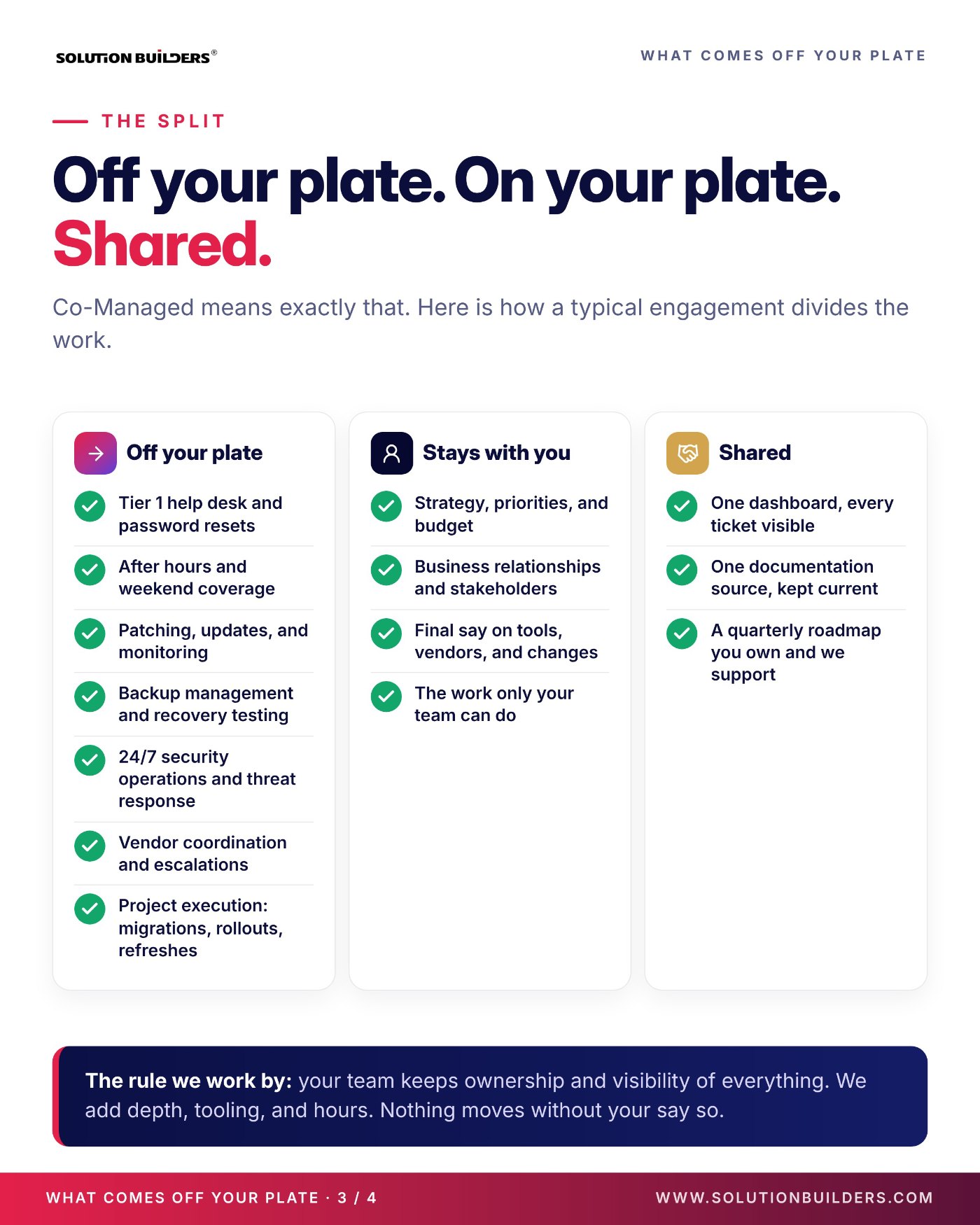
Co-managed means exactly that. Your team stays the owner of the environment. Solution Builders adds hours, tooling and specialists underneath it. Here is how a typical Co-Managed IT engagement divides the work.
On your plate
- Strategy, priorities and budget
- Business relationships and stakeholders
- Final say on tools, vendors and changes
- The work only your team can do
Off your plate
- Tier 1 help desk and password resets
- After hours and weekend coverage
- Patching, updates and monitoring
- Backup management and recovery testing
- 24/7 security operations and threat response
- Vendor coordination and escalations
- Project execution: migrations, rollouts, refreshes
Three things are shared on purpose, because they are where visibility lives.
- One dashboard. Every ticket, note and resolution visible to your team in real time, whether our engineer or yours closed it.
- One documentation source. Owned by you, kept current by both teams, so nothing lives in one person's head.
- A quarterly roadmap. You own it. We support it with the hands and the hours to actually finish the items on it.
The rule we work by is simple: your team keeps ownership and visibility of everything, and nothing moves without your say so. An IT manager in St. Paul does not lose the keys. They gain a bench.
How a co-managed IT help desk in Minnesota actually runs
The help desk is where most co-managed engagements start, because it is where the hours go. Here is how a request flows once the engagement is live.
| Request | Who takes it | What your team sees |
|---|---|---|
| Locked account, password reset, printer | Solution Builders tier 1, 5 minute average response | Ticket and resolution in the shared dashboard |
| Server alert at 2 a.m. | Solution Builders 24/7 engineers | A summary waiting in the morning |
| Suspicious sign in or malware alert | 24/7 security operations center | Incident timeline and what was contained |
| Line of business application question | Your team, with our escalation behind it | Same queue, same dashboard |
| New hire setup | Shared: your checklist, our hands | Status in the client portal |
Three details separate a real co-managed help desk from a glorified answering service. First, your tools or ours, your call, with no lock in: if your team already runs a ticketing platform, we work inside it. Second, a written escalation path with named people on both sides, so a tier 1 technician in Bloomington knows exactly when to hand a ticket to your application owner. Third, after hours IT coverage that is actually staffed: engineers and a security operations center that work nights, weekends and holidays, not a pager that rings your own lead at home.
The payoff shows up fast. Across Solution Builders clients the help desk runs at a 5 minute average response time with 98% satisfaction, scored on every ticket, and your team's own queue starts shrinking inside the first month.
What changes in the first 90 days, co-managed
A co-managed engagement should show results inside one quarter, and it should not pull your people off daily support to get there. Here is the shape of a typical one.
- Day 1Access, tooling and the shared dashboard go live. Overflow and after hours routing starts, so the 2 a.m. alerts stop reaching your lead.
- Day 30Documentation is current, after hours coverage is proven, and the first specialist request, usually security or Microsoft 365, is completed.
- Day 60Ticket volume on your team is visibly down. The first stalled project is scoped and started, with a finish date.
- Day 90Quarterly review: response times, volume, project status and what to take on next, reported in your numbers, not ours.
That last number belongs to an 85 user manufacturer in the metro that eliminated more than 100 hours of monthly downtime, cut support tickets 60% and completed a full transformation in 90 days. The project muscle came from our professional services team, which runs migrations, refreshes and security rollouts with a start date and a finish date, while your people keep the lights on. For the longer version, including the three engagement models and what to put in the agreement, read The IT Leader's Guide to Co-Managed IT.
How to scope a co-managed engagement this quarter
You can scope this yourself in a week, before you talk to anyone. Five things to do.
- Export two weeks of tickets and sort them by category. The tier 1 share is the first thing that comes off your plate.
- Write down which project has been waiting the longest, and what it has cost the business to wait.
- List what must stay in house: the applications, relationships and decisions only your team should touch.
- Decide whether you want a partner inside your ticketing tool or theirs, and ask every candidate for a written escalation path.
- Ask for the exit terms before the pricing. Solution Builders runs month to month, because trust is earned monthly.
Keep your team. Give them superpowers.Co-Managed IT: What Comes Off Your Plate
Then bring the list to a 30 minute scoping call with a Solution Builders engineer. We will tell you what it takes, who does what, and what your team keeps, from our Bloomington office, SOC 2 Type II audited so your auditors can see our controls too. Co-managed is the I in RISE in practice: your team, our depth, one integrated operation.
Co-Managed IT for internal IT teams across the Twin Cities
Solution Builders has backed Minnesota IT teams from Bloomington since 1995. Our 50+ engineers, 24/7 help desk and security operations center sit behind IT directors and IT managers at companies with 25 to 500 employees in Minneapolis, St. Paul and across the state, from multi-location manufacturers to professional services firms downtown. Related services: Co-Managed IT, Cybersecurity, Professional Services. Contact us or book a 30 minute call.