Solution Builders team
Jump to a section
- Score every idea on frequency, time per task, data availability and risk. Sixteen or more out of twenty is a pilot. The rest are demos.
- The first use cases that pay back are boring, frequent and measurable: meeting recaps, first drafts, document search, ticket triage.
- A pilot is 30 days, one use case, a dozen people including a skeptic, a baseline measured before the tool arrives and a decision rule.
- Your people are already using AI. The question is where. Make the safe path the easy path with enterprise accounts and DLP.
- A one page policy everyone can quote beats thirty pages nobody reads. Put the detail in a data classification table.
Why most AI projects at small businesses fail
A 150 person professional services firm in downtown Minneapolis bought Copilot licenses for everyone last spring. A champion in marketing loved it. Six months later about a fifth of the seats are active, the CFO is asking what the line item bought, and three people in finance quietly use a free chatbot on their phones because it is faster. Nobody did anything wrong. They just skipped the part where you decide what AI is for. That is the normal state of AI adoption at companies with 25 to 500 employees across the Twin Cities, and it is why AI consulting for small business in Minneapolis has to start with selection, not software.
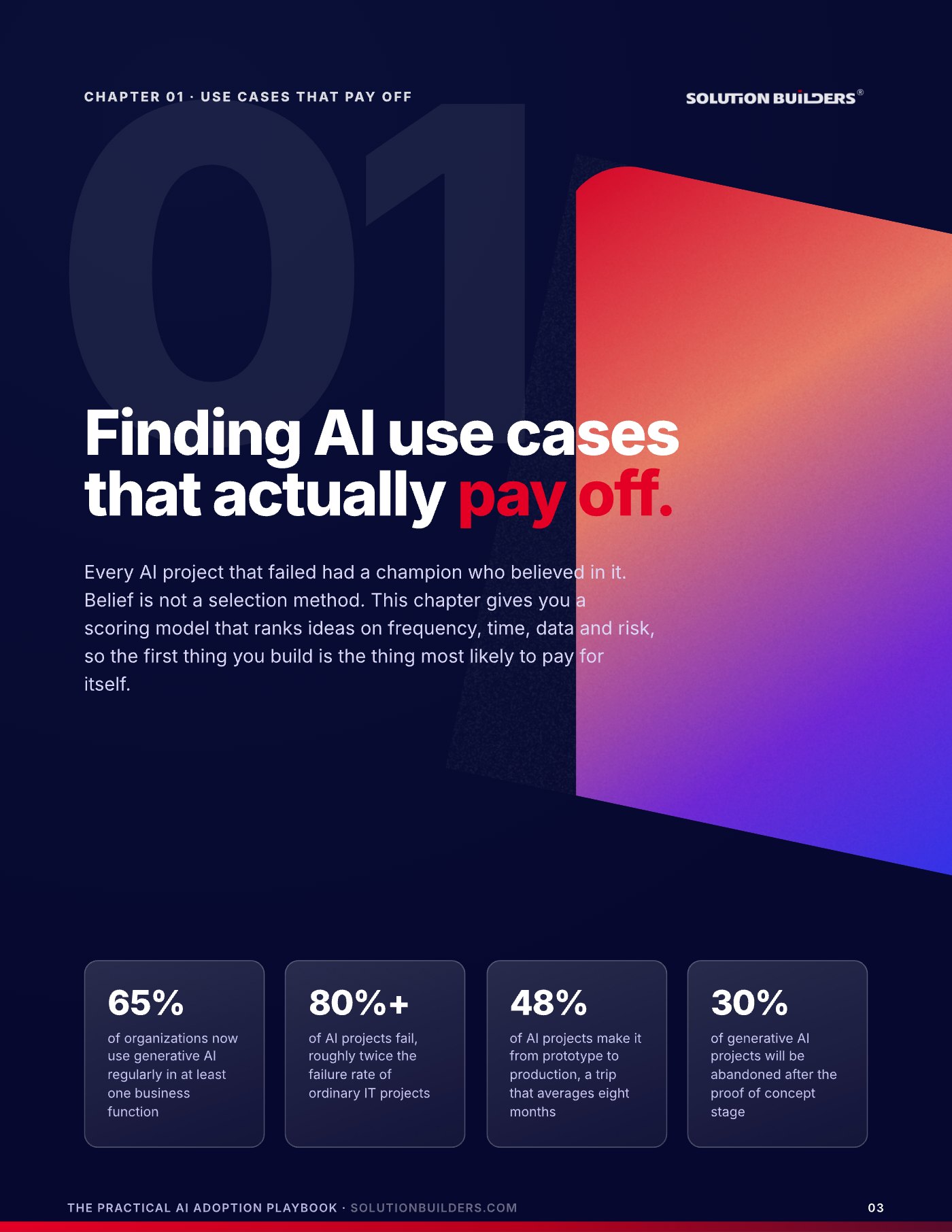
The numbers explain the gap between enthusiasm and results. Adoption is broad, according to McKinsey's State of AI survey, and failure is routine: RAND Corporation's 2024 study put the AI project failure rate above 80%, roughly twice the rate of ordinary IT projects, and Gartner found the trip from prototype to production averages eight months when it happens at all.
Every AI project that failed had a champion who believed in it. Belief is not a selection method. What works is a plain sequence: score the ideas, pilot one for 30 days with a baseline, put quiet controls behind the approved tools and write a policy people can quote. AI consulting from Solution Builders in Bloomington runs exactly that sequence, and this article walks through it the way we do in client workshops.
Score every idea on four factors before you build
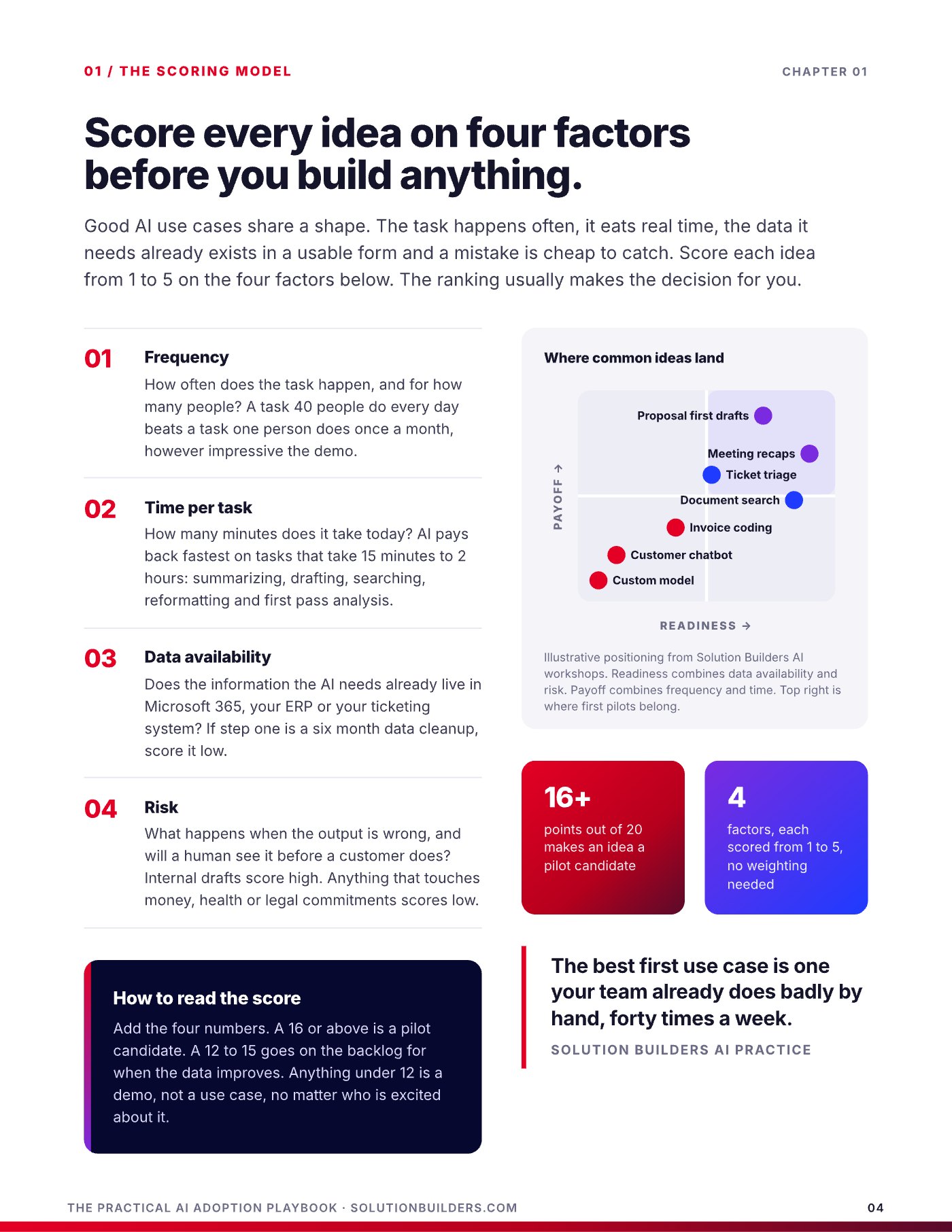
Good AI use cases share a shape. The task happens often, it eats real time, the data it needs already exists in a usable form and a mistake is cheap to catch. Score each idea from 1 to 5 on the four factors below, add them up, and the ranking usually makes the decision for you.
- FrequencyHow often does the task happen, and for how many people? A task 40 people do every day beats a task one person does once a month, however impressive the demo.
- Time per taskHow many minutes does it take today? AI pays back fastest on tasks that take 15 minutes to 2 hours: summarizing, drafting, searching, reformatting and first pass analysis.
- Data availabilityDoes the information the AI needs already live in Microsoft 365, your ERP or your ticketing system? If step one is a six month data cleanup, score it low.
- RiskWhat happens when the output is wrong, and will a human see it before a customer does? Internal drafts score high. Anything that touches money, health or legal commitments scores low.
Sixteen or more is a pilot. Under twelve is a demo.
Add the four numbers. A 16 or above out of 20 is a pilot candidate. A 12 to 15 goes on the backlog for when the data improves. Anything under 12 is a demo, not a use case, no matter who is excited about it. No weighting needed.
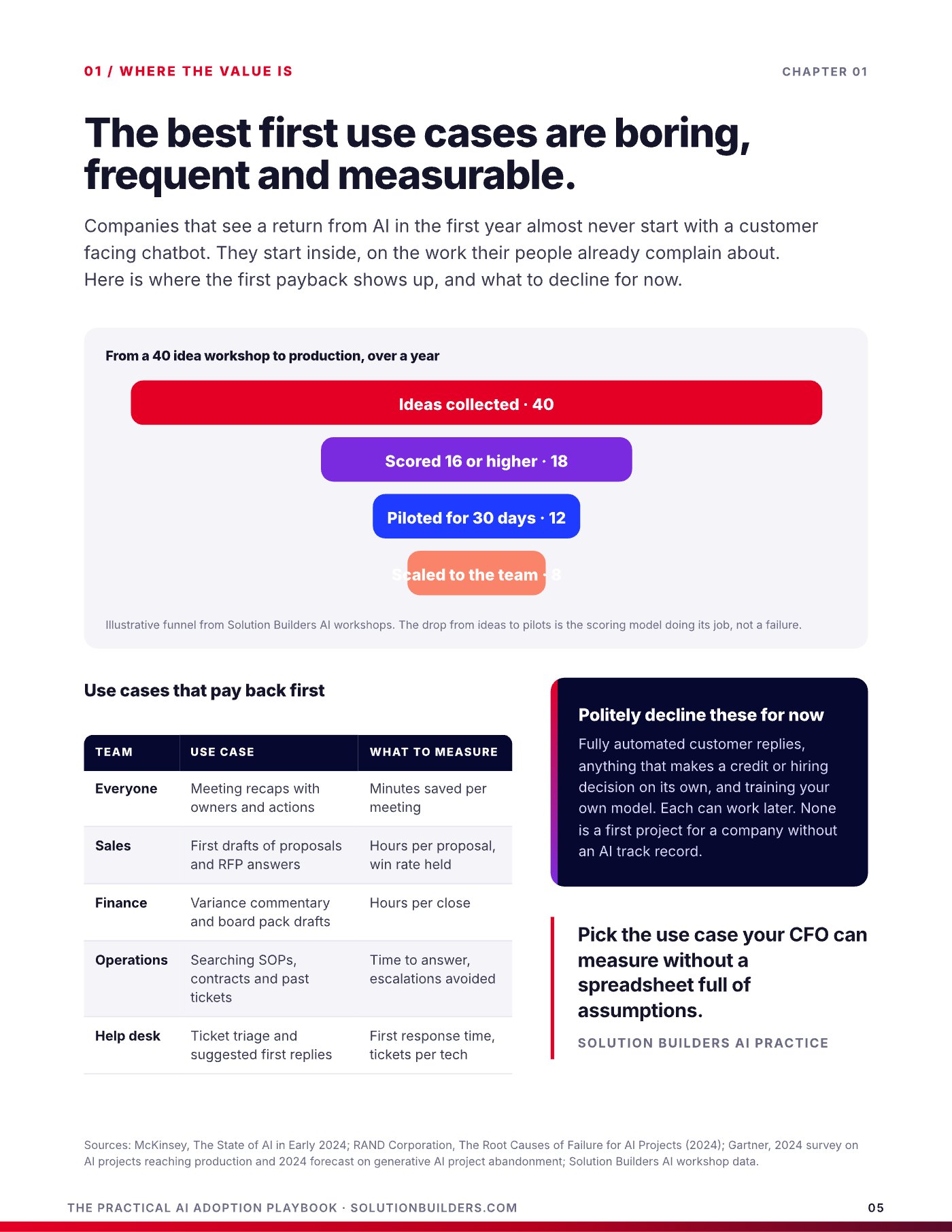
In a typical Solution Builders AI workshop, a leadership team collects about 40 ideas, 18 score 16 or higher, 12 get a 30 day pilot and 8 scale to the team over a year. The drop from ideas to pilots is the scoring model doing its job. Proposal first drafts and meeting recaps land in the top right of the chart almost every time. A customer chatbot and a custom trained model land in the bottom left, where they belong for a company without an AI track record.
The best first use cases are boring, frequent and measurable
Companies that see a return from AI in the first year almost never start with a customer facing chatbot. They start inside, on the work their people already complain about, and they pick use cases a CFO can measure without a spreadsheet full of assumptions.
| Team | Use case | What to measure |
|---|---|---|
| Everyone | Meeting recaps with owners and actions | Minutes saved per meeting |
| Sales | First drafts of proposals and RFP answers | Hours per proposal, win rate held |
| Finance | Variance commentary and board pack drafts | Hours per close |
| Operations | Searching SOPs, contracts and past tickets | Time to answer, escalations avoided |
| Help desk | Ticket triage and suggested first replies | First response time, tickets per tech |
Notice what the list has in common. Every item happens weekly or daily, takes a measurable chunk of time today, runs on data already in Microsoft 365 or a ticketing system, and produces a draft a human reviews before anyone outside sees it. A St. Paul engineering firm that spends four hours per proposal and sends ten a month has a use case worth 40 hours a month before anyone talks about models. A manufacturer whose help desk fields the same 30 questions can measure first response time to the minute.
Three ideas to politely decline for now: fully automated customer replies, anything that makes a credit or hiring decision on its own, and training your own model. Each can work later. None is a first project for a company without an AI track record, and each scores low on risk or data availability for a reason.
The best first use case is one your team already does badly by hand, forty times a week.Solution Builders AI Practice
Design a 30 day pilot that can fail cheaply and win clearly
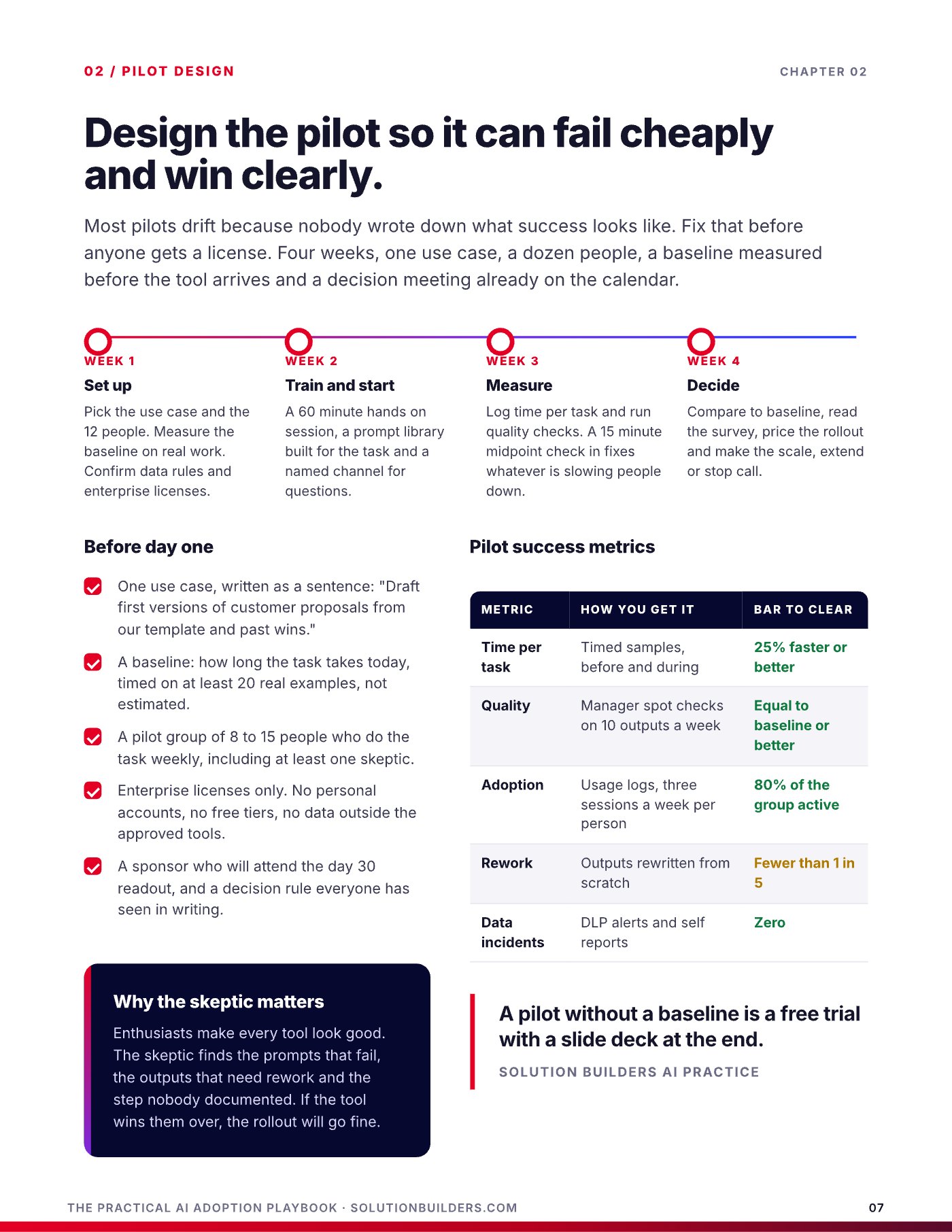
A pilot is not a trial subscription with good intentions. It is an experiment with a start date, an end date, a baseline and a decision rule agreed in advance. MIT's NANDA initiative reported in its 2025 GenAI Divide study that 95% of enterprise generative AI pilots show no measurable profit and loss impact. Most of those pilots drifted because nobody wrote down what success looked like. Fix that before anyone gets a license.
- One use case, written as a sentence: "Draft first versions of customer proposals from our template and past wins."
- A baseline: how long the task takes today, timed on at least 20 real examples, not estimated.
- A pilot group of 8 to 15 people who do the task weekly, including at least one skeptic.
- Enterprise licenses only. No personal accounts, no free tiers, no data outside the approved tools.
- A sponsor who will attend the day 30 readout, and a decision rule everyone has seen in writing.
Week one is setup: the use case, the people, the baseline, the data rules. Week two is a 60 minute hands on session, a prompt library built for the task and a named channel for questions. Week three is measurement, with a 15 minute midpoint check in. Week four is the decision. The skeptic matters because enthusiasts make every tool look good. The skeptic finds the prompts that fail, the outputs that need rework and the step nobody documented. If the tool wins them over, the rollout will go fine.
| Metric | How you get it | Bar to clear |
|---|---|---|
| Time per task | Timed samples, before and during | 25% faster or better |
| Quality | Manager spot checks on 10 outputs a week | Equal to baseline or better |
| Adoption | Usage logs, three sessions a week per person | 80% of the group active |
| Rework | Outputs rewritten from scratch | Fewer than 1 in 5 |
| Data incidents | DLP alerts and self reports | Zero |
Microsoft's WorkLab research found that 11 minutes saved per day is the point where people start to feel a tool is worth it. That is a useful floor for the time bar. If a pilot cannot clear it on timed samples, the use case was a demo.
Measure hours saved the way a CFO would
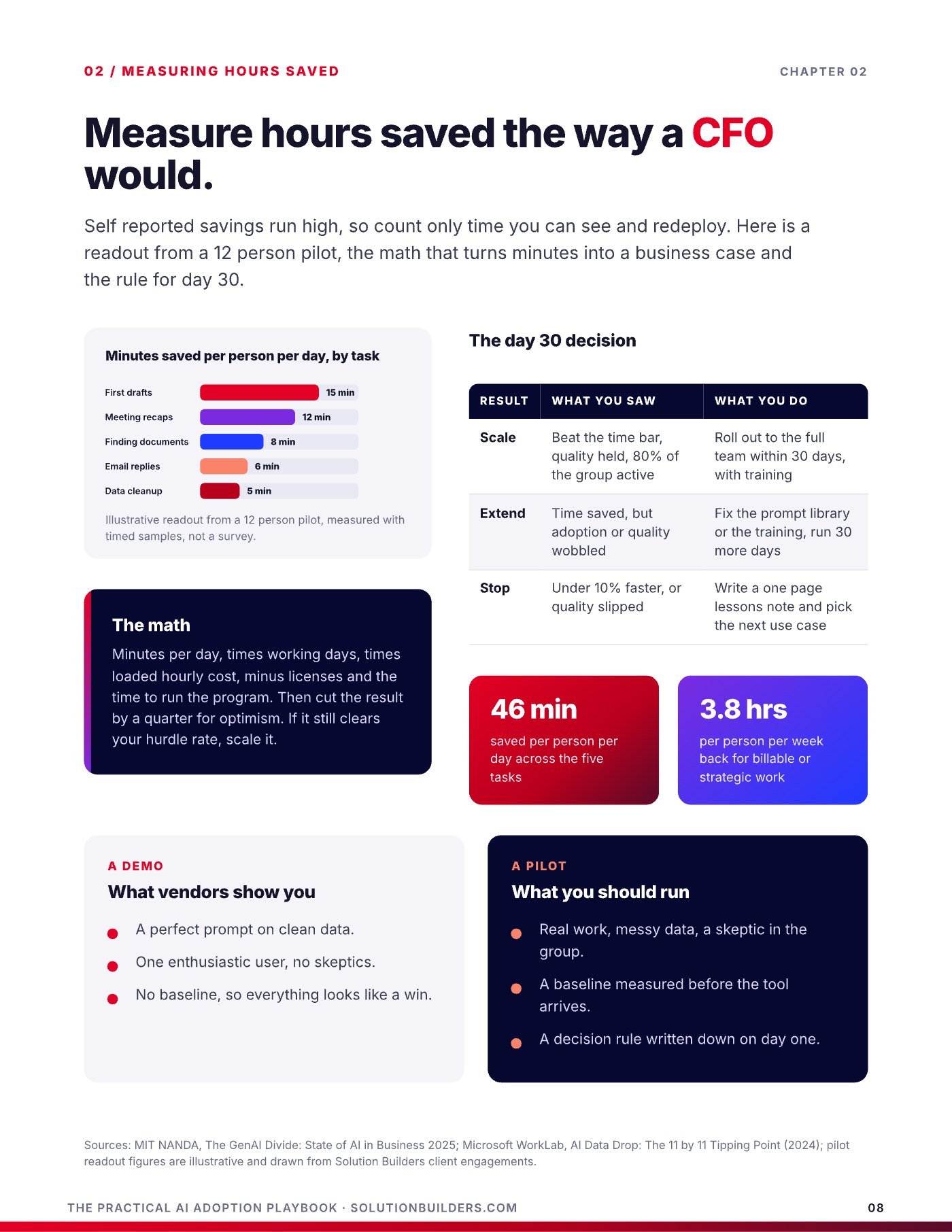
Self reported savings run high, so count only time you can see and redeploy. In an illustrative 12 person pilot measured with timed samples, first drafts saved about 15 minutes per person per day, meeting recaps 12, finding documents 8, email replies 6 and data cleanup 5. That is roughly 46 minutes a day, or 3.8 hours per person per week back for billable or strategic work. The math is simple: minutes per day, times working days, times loaded hourly cost, minus licenses and the time to run the program. Then cut the result by a quarter for optimism. If it still clears your hurdle rate, scale it.
| Result | What you saw | What you do |
|---|---|---|
| Scale | Beat the time bar, quality held, 80% of the group active | Roll out to the full team within 30 days, with training |
| Extend | Time saved, but adoption or quality wobbled | Fix the prompt library or the training, run 30 more days |
| Stop | Under 10% faster, or quality slipped | Write a one page lessons note and pick the next use case |
The decision on day 30 is the whole point of the design. A stop is not a failure. It is a use case that cost you a month and a handful of licenses instead of a year and a budget line, and the lessons note makes the next pilot sharper.
What vendors show you
- A perfect prompt on clean data
- One enthusiastic user, no skeptics
- No baseline, so everything looks like a win
What you should run
- Real work, messy data, a skeptic in the group
- A baseline measured before the tool arrives
- A decision rule written down on day one
AI governance for SMBs: keep company data out of public tools
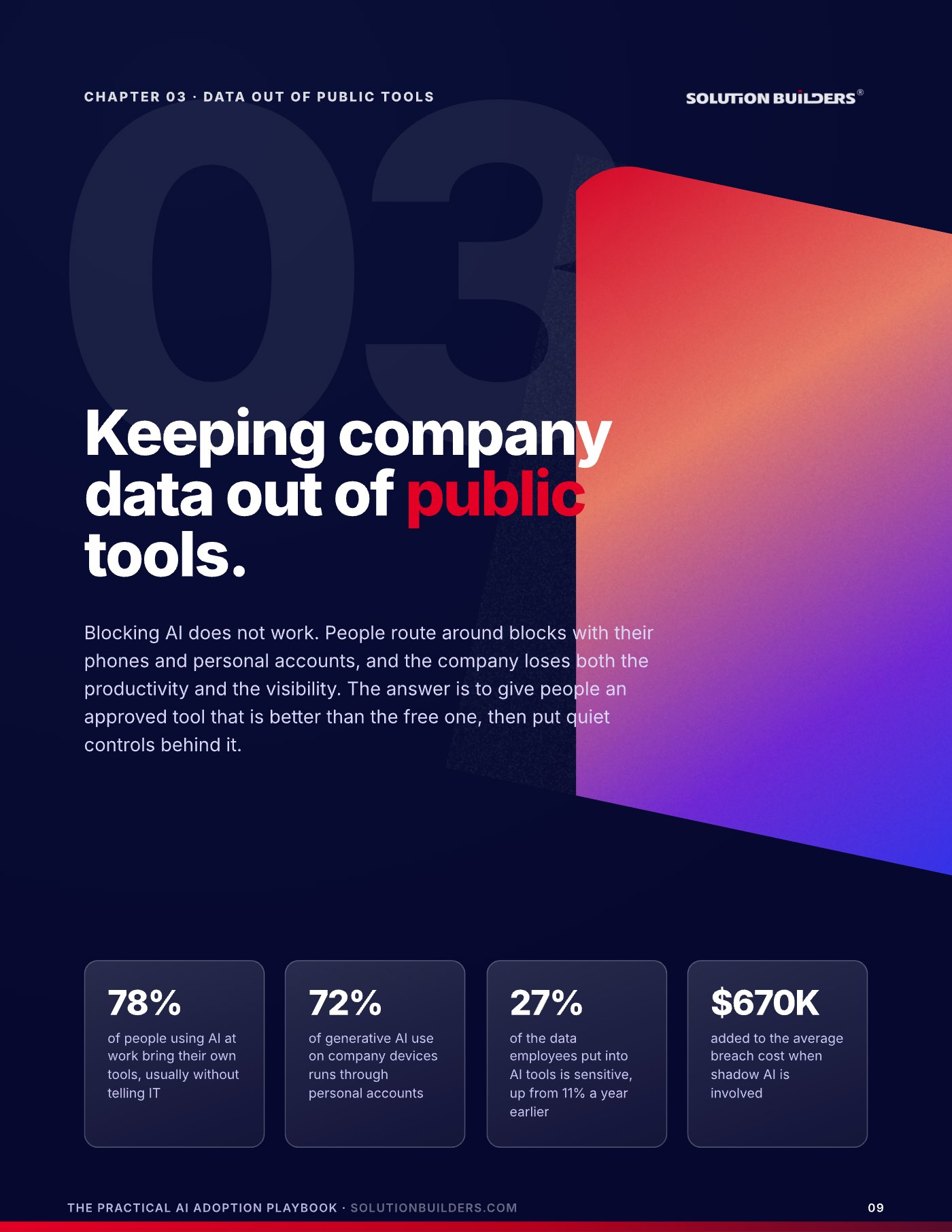
Blocking AI does not work. People route around blocks with their phones and personal accounts, and the company loses both the productivity and the visibility. Shadow AI is already in your building, and the research from Microsoft, Cyberhaven and IBM below says how much of it runs through accounts you cannot see.
The risk is not the technology. It is the account. A free chatbot on a personal login may keep prompts, use them for training and sits outside every control you own. The same model under an enterprise agreement, or Microsoft 365 Copilot inside your tenant, is a different product: prompts stay in the tenant, answers are limited to what each user may already open, and audit logs, retention and sensitivity labels apply automatically. In 2023 Samsung engineers pasted confidential source code into a public chatbot while fixing a bug. Nobody was trying to leak anything. The safe option was slower.
- Publish the approved listOne page: which tools are approved, for which data class, and how to request a new one. Review it every quarter.
- Buy enterprise seats where neededCopilot or an enterprise plan for the roles with real use cases. A paid seat is cheaper than one incident.
- Turn on data loss preventionPurview DLP, included with Microsoft 365 Business Premium and E3, warns or blocks when confidential data heads for an unapproved site. Start with labeled files and pastes that match card or Social Security numbers.
- Govern the long tailDefender for Cloud Apps shows every AI app in use. Sanction the good ones, block the rest and tell people why.
- Give everyone a safe defaultCopilot Chat with enterprise data protection comes with Microsoft 365. Make it the first thing people find when they search for "AI."
None of these require a new security team. Most are settings in Microsoft 365 and Entra ID that you already pay for, and done in this order they take about two weeks. For the roles with scored use cases, a governed Microsoft Copilot rollout is the safe default that is also the better tool.
An AI policy people will read fits on one page
The best AI policy in your industry is one page long and everyone can quote it. The worst is 30 pages, written by counsel, read by nobody and discovered during an incident. IBM's 2025 breach research found 63% of breached organizations had no AI governance policy or were still writing one. A working policy answers eight questions in plain language: purpose and scope, approved tools by data class, the data classes themselves, acceptable use (what AI may draft and what it may never decide alone), human in the loop by name, transparency, security and privacy, and review and incidents. The data classification table does most of the work.
| Data class | Public chatbot | Enterprise AI | Copilot in tenant |
|---|---|---|---|
| Public | Yes | Yes | Yes |
| Internal | No | Yes | Yes |
| Confidential | No | With DLP and labels | Yes |
| Restricted | No | No | Labeled and limited |
Restricted means regulated or contractually protected data: health records, card data, CUI for defense suppliers, source code under NDA. Human in the loop means a named person reviews, and is accountable for, any AI output that goes to a customer, makes a decision about a person or commits the company to anything. Then give the policy a rhythm, because the tools change monthly: publish and train on day 1, read the DLP and usage reports on day 30, run the pilot readouts on day 60 and brief leadership on day 90. Borrow structure from the NIST AI Risk Management Framework and ISO/IEC 42001 rather than inventing your own.
- A one page policy exists, signed by leadership and acknowledged by every employee.
- An approved tool list is published and reviewed at least quarterly.
- Every approved tool runs on enterprise accounts with single sign on and audit logs.
- Vendor contracts state that your data is not used for training and name a retention period.
- A use case register tracks every pilot with its score, owner, metrics and decision.
- Employees know how to report an AI slip without fear, and at least one has done so.
AI consulting for small business in Minneapolis: your next three moves
Three moves, in order, and only one of them involves a license.
- Run the scoring sessionGet your leadership team in a room for 90 minutes. Collect every AI idea, score each on frequency, time, data and risk, and keep the ones at 16 or above. Expect the list to shrink.
- Fix the account problem this weekPublish the approved tool list, turn on Copilot Chat with enterprise data protection as the default, and switch on the first two DLP rules. That closes most of the shadow AI risk before the first pilot starts.
- Get an outside readAn AI Opportunity Snapshot with Solution Builders is a free 30 minute conversation. You leave with your top three scored use cases and the one data risk to fix first, whether or not you ever work with us.
If your people cannot quote the policy, you do not have one. You have a document.Solution Builders AI Practice
Solution Builders has run technology for Minnesota businesses from Bloomington since 1995. AI is the E in our RISE framework, Evolving, and it sits on top of the other three letters on purpose: a governed Microsoft 365 tenant, tested backups and a 24/7 security operations center, so new tools never break the compliance story. If Copilot is the tool on your shortlist, the Copilot Readiness Playbook covers the tenant work that has to happen first.
Practical AI adoption for companies across the Twin Cities
Solution Builders has run technology for Minnesota businesses from Bloomington since 1995. Our AI consulting practice scores use cases, runs pilots, governs Microsoft 365 tenants and writes the one page policy for companies with 25 to 500 employees in Minneapolis, St. Paul and across the metro, from professional services firms downtown to manufacturers with a plant in Greater Minnesota. Related services: AI Consulting, Microsoft Copilot, Microsoft 365, Cybersecurity. Contact us or book a 30 minute call.