Solution Builders team
Jump to a section
- Copilot grants no new access. It makes every old sharing decision findable in one prompt, which is why permissions come before licenses.
- Two settings stop most of the bleeding: convert public teams to private and set the default sharing link to specific people.
- A four week cleanup, discover, contain, fix, label and test, handles most oversharing in a 25 to 500 person tenant.
- Adoption is a 90 day program with champions, three use cases per role, a four part prompt formula and a monthly report of hours saved.
Why Microsoft Copilot consulting in Minnesota starts with permissions
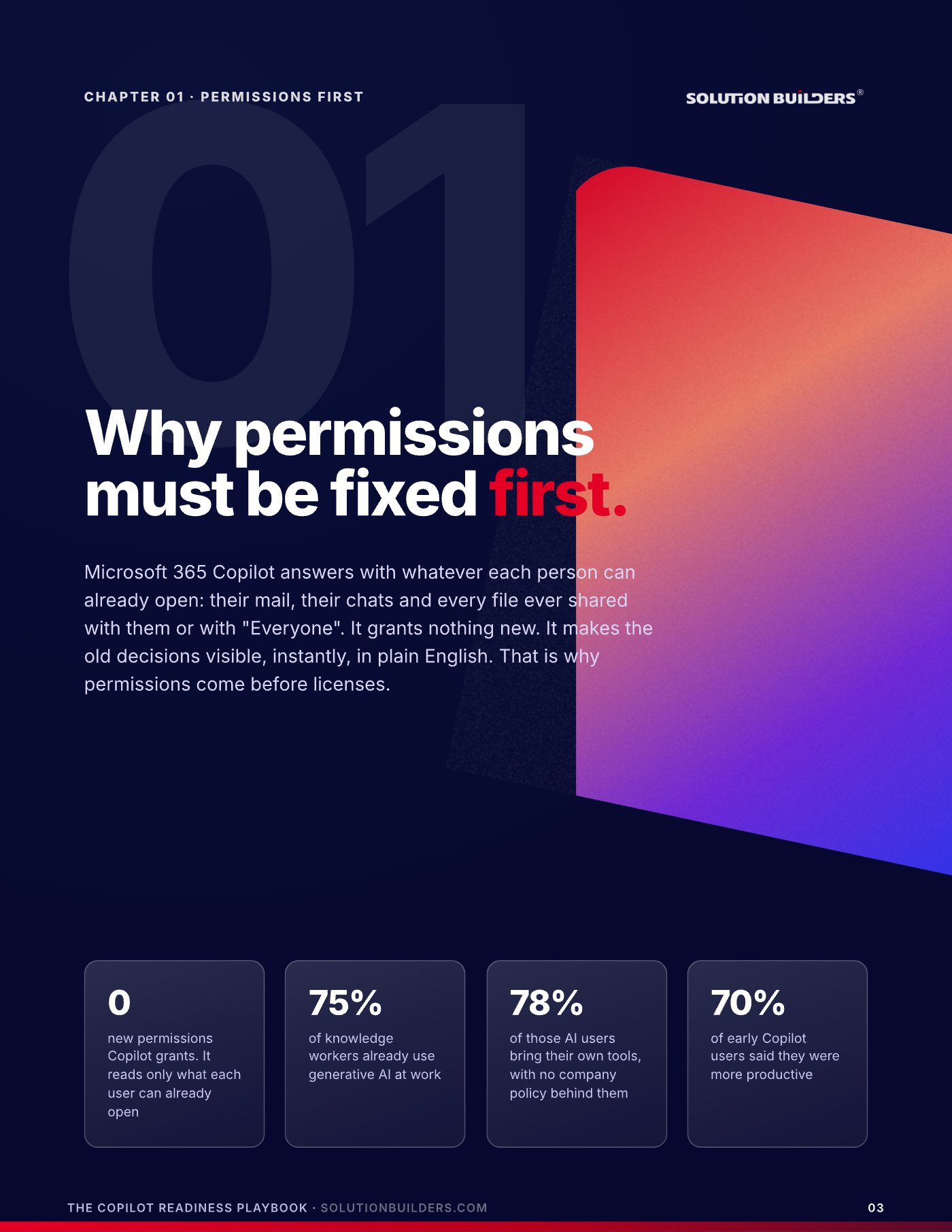
The request usually arrives as a license count. A leadership team in Minneapolis or St. Paul has seen the demo, the CFO has approved a pilot, and someone asks IT how fast the seats can go out. The honest answer from anyone doing Microsoft Copilot consulting in Minnesota is: after the permissions are fixed. Microsoft 365 Copilot answers with whatever each person can already open, their mail, their chats and every file ever shared with them or with "Everyone". It grants nothing new. It makes the old decisions visible, instantly, in plain English. A spreadsheet shared with the whole company in 2017 was always a problem. Now it answers questions.
Those two middle numbers are the reason to move rather than wait. Three quarters of your people are already using AI at work, and most of them are pasting company information into tools you have never reviewed. The fix order is permissions, then labels, then licenses, then training. Reverse it and the pilot month becomes a cleanup project with an audience, and the pilot group remembers the week Copilot found the salary file. This article is the readiness half of the story. The adoption half, for any AI tool, is in our Practical AI Adoption Playbook, and both are how the Microsoft Copilot team at Solution Builders runs a rollout for companies with 25 to 500 people.
Copilot reads what each person can open. All of it
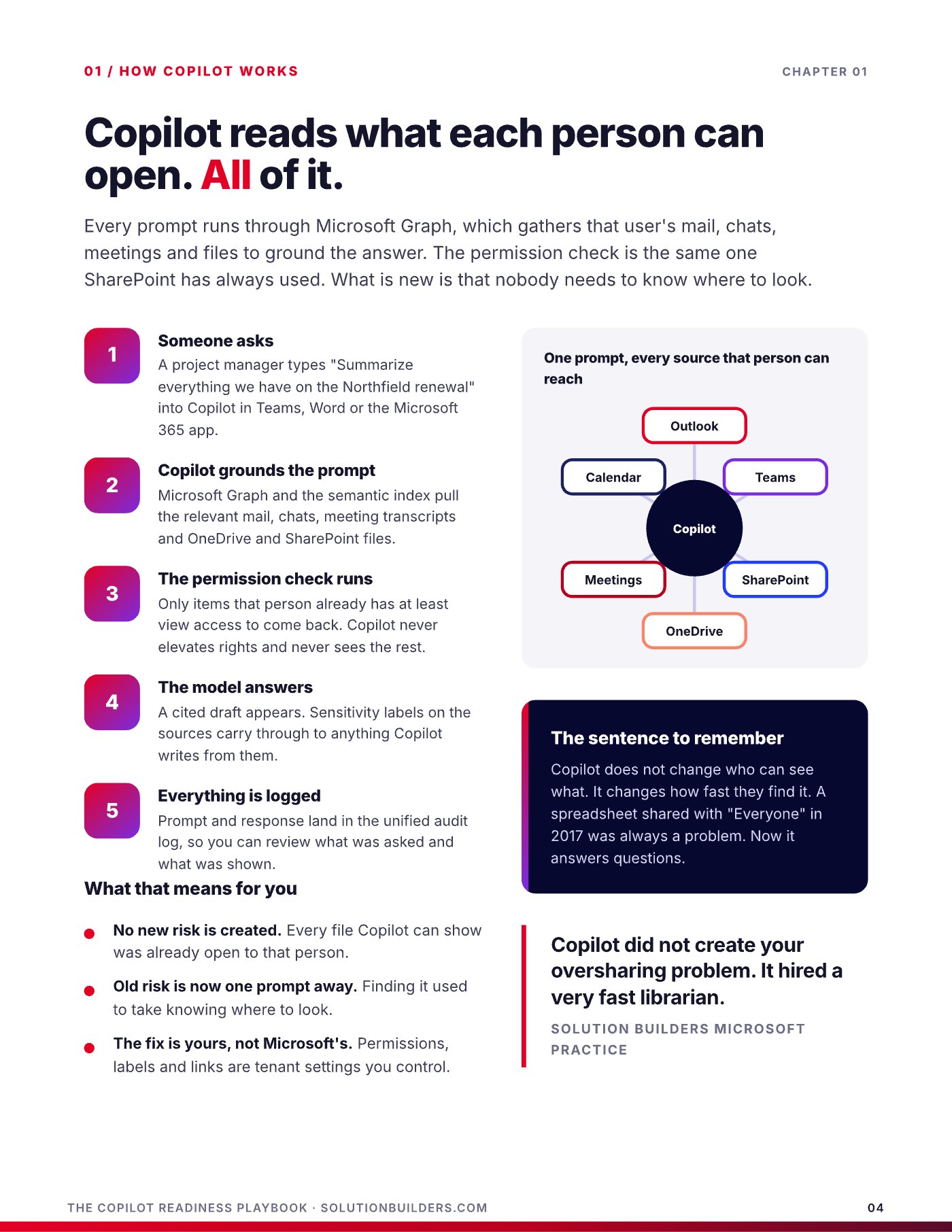
Every prompt runs through Microsoft Graph, which gathers that user's mail, chats, meetings and files to ground the answer. The permission check is the same one SharePoint has always used. What is new is that nobody needs to know where to look.
- Someone asksA project manager types "Summarize everything we have on the Northfield renewal" into Copilot in Teams, Word or the Microsoft 365 app.
- Copilot grounds the promptMicrosoft Graph and the semantic index pull the relevant mail, chats, meeting transcripts and OneDrive and SharePoint files.
- The permission check runsOnly items that person already has at least view access to come back. Copilot never elevates rights and never sees the rest.
- The model answersA cited draft appears. Sensitivity labels on the sources carry through to anything Copilot writes from them.
- Everything is loggedPrompt and response land in the unified audit log, so you can review what was asked and what was shown.
Technically, every overshared file has been one search away for years. In practice nobody searched. People reach files through links and folders they already know. Copilot removes that friction, then summarizes, so a stray spreadsheet becomes a stray paragraph in a board draft. Three things make the risk different now. It summarizes: nobody opens 200 files, but Copilot reads them and returns the paragraph with the sensitive number in it. It crosses silos: one answer can combine a chat, a spreadsheet and an email nobody would have connected. And it lives inside the work: the question gets asked mid draft, not in a deliberate search, so the answer gets pasted.
Copilot does not change who can see what. It changes how fast they find it.
Nobody searched for the salary spreadsheet. Everybody will ask Copilot about raises. No new risk is created, old risk is now one prompt away, and the fix is yours, not Microsoft's, because permissions, labels and links are tenant settings you control.
The Copilot oversharing risk, explained
Nobody decided to overshare. A team went public so a new hire could find it. A link went to "People in your organization" because it was Friday. Multiply that by ten years and two migrations, and sensitive files sit open to people who never knew. SharePoint has about seven ways to give someone access, and two of them hand content to the whole company in one click. One hands it to the internet.
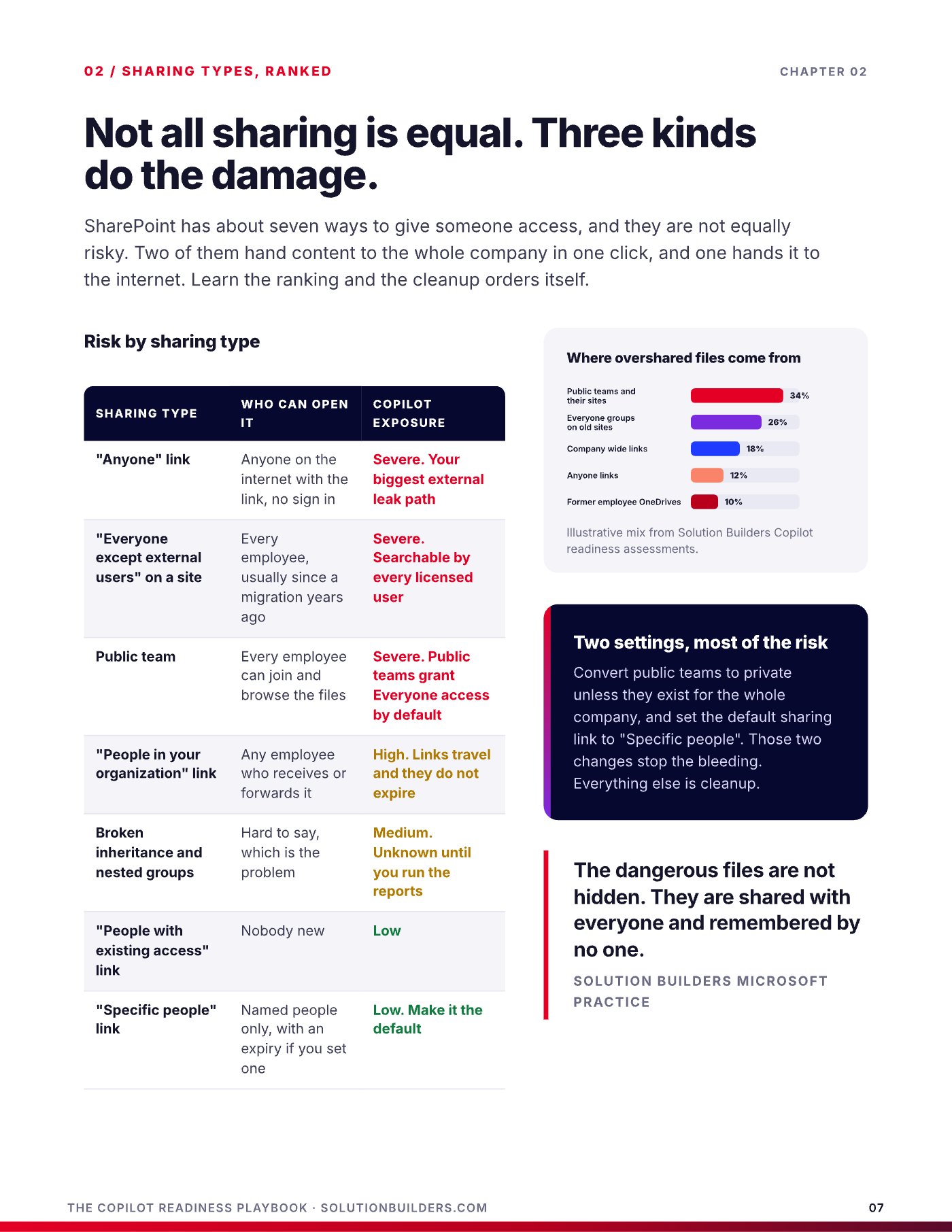
| Sharing type | Who can open it | Copilot exposure |
|---|---|---|
| "Anyone" link | Anyone on the internet with the link, no sign in | Severe. Your biggest external leak path |
| "Everyone except external users" on a site | Every employee, usually since a migration years ago | Severe. Searchable by every licensed user |
| Public team | Every employee can join and browse the files | Severe. Grants Everyone access by default |
| "People in your organization" link | Any employee who receives or forwards it | High. Links travel and do not expire |
| Broken inheritance and nested groups | Hard to say, which is the problem | Medium. Unknown until you run the reports |
| "Specific people" link | Named people only, with an expiry if you set one | Low. Make it the default |
In our Copilot readiness assessments the overshared files come from the same places: public teams, Everyone groups left on old sites, company wide links, Anyone links and the OneDrives of former employees. Picture four files. Salary bands shared with Everyone in 2019, found by nobody in years, now summarized for anyone who asks about raises. A board deck buried in a dead public channel, now quoted in the next quarterly recap. Then the two that behave: a client contract labeled Confidential stays account team only, and an HR site with Restricted Content Discovery is invisible to Copilot for everyone else. No alert fires in the first two cases, because the access was legitimate.
The dangerous files are not hidden. They are shared with everyone and remembered by no one.Solution Builders Microsoft Practice
Two settings stop most of the bleeding: convert public teams to private, and set the default sharing link to "Specific people". Everything else is cleanup.
A four week Microsoft 365 permissions cleanup that fixes most of it
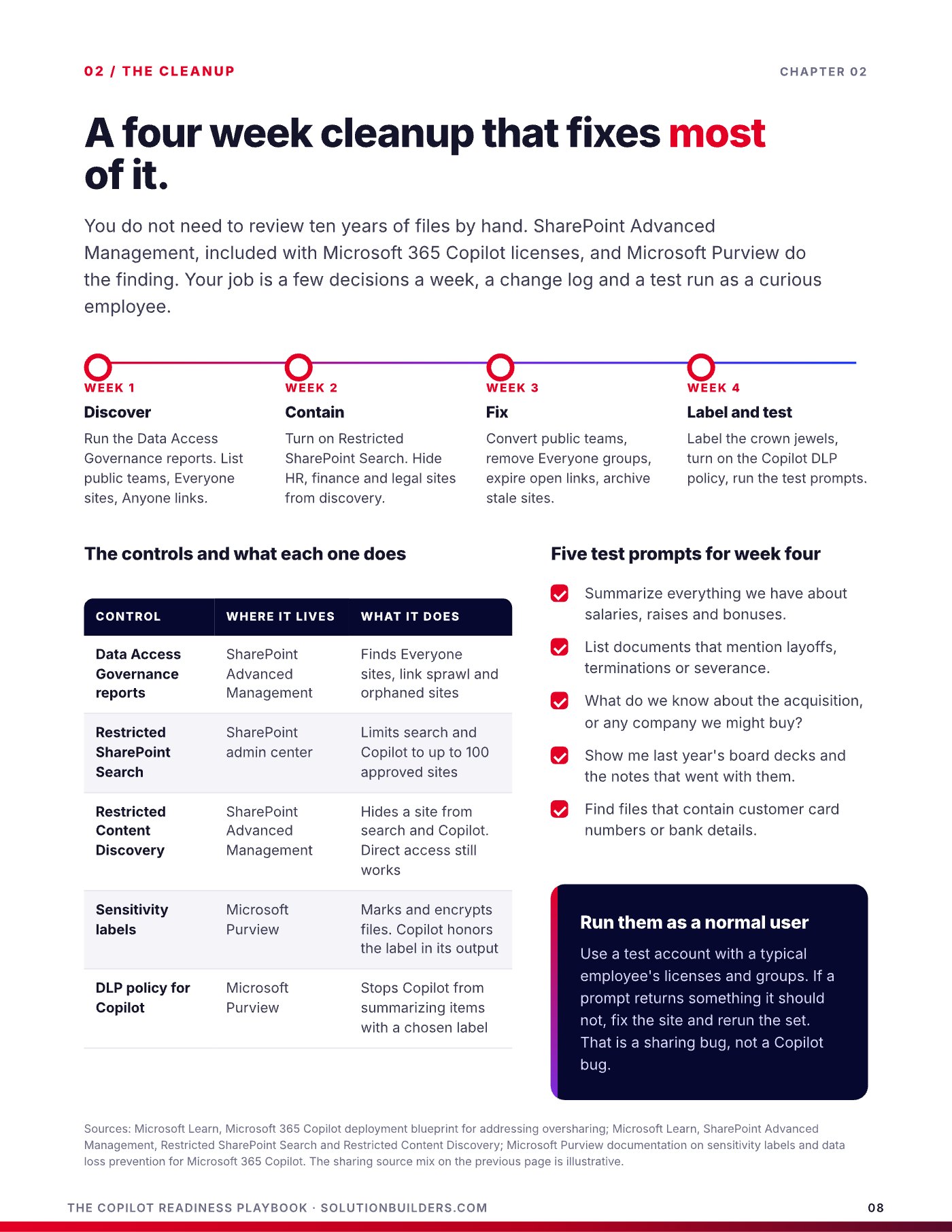
You do not need to review ten years of files by hand. SharePoint Advanced Management, included with Microsoft 365 Copilot licenses, and Microsoft Purview do the finding. Your job is a few decisions a week, a change log and a test run as a curious employee. A Microsoft 365 permissions cleanup for a 25 to 500 person tenant takes about four weeks.
- Week 1: discoverRun the Data Access Governance reports in SharePoint Advanced Management. List public teams, Everyone sites, Anyone links and orphaned sites.
- Week 2: containTurn on Restricted SharePoint Search, which limits search and Copilot to up to 100 approved sites while cleanup runs. Use Restricted Content Discovery to hide HR, finance and legal sites from Copilot without touching direct access.
- Week 3: fixConvert public teams, remove Everyone groups, expire open links, archive stale sites, and review departed employees' OneDrives for sensitive folders.
- Week 4: label and testLabel the crown jewels with Purview sensitivity labels, turn on the DLP policy that stops Copilot from summarizing items with a chosen label, then run the test prompts.
Run the prompts below from a test account with a typical employee's licenses and groups. If one returns something it should not, fix the site and rerun the set. That is a sharing bug, not a Copilot bug.
- Summarize everything we have about salaries, raises and bonuses.
- List documents that mention layoffs, terminations or severance.
- What do we know about the acquisition, or any company we might buy?
- Show me last year's board decks and the notes that went with them.
- Find files that contain customer card numbers or bank details.
Most of this is the same hygiene a well run tenant should have anyway, which is why our Microsoft 365 practice treats Copilot readiness as a tenant health project with an AI deadline, not a separate product.
A Copilot readiness assessment you can score yourself
The first mistake is buying the wrong thing. Two products share the name. Copilot Chat comes with business and enterprise Microsoft 365 plans and never touches your files. Microsoft 365 Copilot is the paid add on that works inside Word, Excel, Outlook and Teams on your data. Since January 2024 the minimum order is one seat.
| Copilot Chat | Microsoft 365 Copilot | |
|---|---|---|
| What it costs | Included with business and enterprise plans | Paid add on, per user, per month |
| What it reads | The web, plus anything the user pastes | Your mail, chats, meetings and files |
| Where it lives | A chat window in the browser and Teams | Inside Word, Excel, Outlook, Teams and the chat |
| Oversharing risk | None. It cannot see your files | Real, until the cleanup is done |
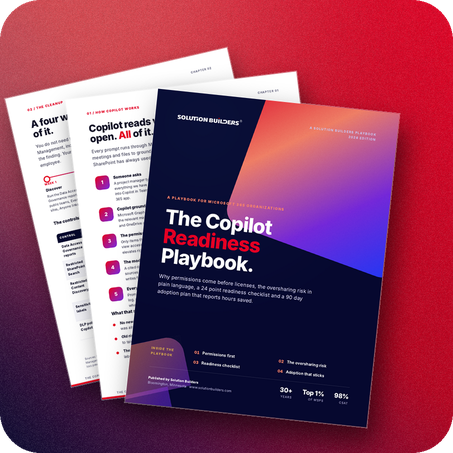
The full Copilot readiness assessment is 24 items across licensing, identity, data and labels, and pilot and proof. These are the ones most rollouts skip.
- Every pilot user has an eligible base license, an Entra ID account, a provisioned OneDrive and current Microsoft 365 Apps.
- Multifactor authentication is enforced for every user, executives included, and conditional access blocks unmanaged devices.
- Admin roles are separate from daily accounts, and the unified audit log is on with long retention.
- Public teams converted, Everyone groups removed, Anyone links expired, default link set to Specific people.
- Sensitivity labels exist for Confidential and Restricted, with the Copilot DLP policy excluding Restricted items.
- A pilot group of 10 to 15 people who do document heavy work, including one skeptic, each with three written use cases.
- A baseline exists: minutes per task on five real tasks, timed before Copilot arrives.
- A day 30 readout is on the sponsor's calendar, with scale, extend or stop as the only outcomes.
Score the full list. Zero to nine means fix permissions first. Ten to seventeen is close, and the usual gaps are labels, pilot and proof. Eighteen or more means assign the pilot licenses. You do not need every box to start: all six data items, all six identity items and four pilot items are enough.
A Copilot rollout in the Twin Cities that actually sticks
The failure mode is familiar. Licenses go out, a launch email goes out, usage spikes for two weeks and settles at a handful of enthusiasts. Copilot is a habit, and habits need champions, specific use cases and about eleven weeks. Microsoft's WorkLab research on the 11 by 11 tipping point found people feel the value at 11 minutes saved a day, and the broader benefits show up around 11 weeks. The Work Trend Index 2024 found only 39% of people using AI at work had any company training. Plan for 90 days, not 30.
- Days 1 to 30: pilot and championsTrain the pilot group in a 60 minute hands on session before licenses go out. Name a champion per team, two hours a week, the people colleagues already ask for help. Time the baseline tasks.
- Days 31 to 60: scale by rolePublish a use case library: meeting recaps for everyone, proposals from past wins for sales, variance explanations in Excel for finance. Run 45 minute role sessions and add the next 50 users.
- Days 61 to 90: habits and proofOffice hours twice a week, a prompt of the week, and the first hours saved report. Teach the four part prompt: goal, context, source, expectations.
- Day 90: decideScale, hold or trim licenses by role. Reassign idle seats.
| Metric | Where it comes from | Healthy by day 90 |
|---|---|---|
| Weekly active users | Admin center usage report | 70% of licensed users |
| Apps per user | Copilot Dashboard in Viva Insights | Three or more |
| Hours saved | Timed tasks against the baseline | Two or more per week |
| Sentiment | Pulse survey in the dashboard | "Would miss it" above 70% |
| Idle seats | Usage report, 30 days | Under 10%, reassigned |
Microsoft's study of early users found them 29% faster on search, writing and summarizing, and 64% said Copilot cut their email time. Those are the numbers finance will accept, once your own baseline exists. A Copilot rollout in the Twin Cities also raises the next question, what else AI should do for the business, which is where our AI consulting practice picks up.
What to do this week
Three moves, in order, before a single license goes out.
- Change the two settingsConvert public teams to private unless they exist for the whole company, and set the default sharing link to "Specific people". That stops the bleeding today.
- Run the five test promptsFrom a test account with a normal employee's access, ask Copilot Chat about salaries, layoffs, acquisitions, board decks and card numbers. Anything that comes back is your week one list.
- Get an outside readA Copilot Readiness Snapshot with Solution Builders is a free 30 minute conversation and a quick look at your tenant. You leave knowing your biggest oversharing risk and your first three use cases. Book a time or call (952) 854 8188.
Copilot readiness sits in the E of the RISE framework, Evolving, and it only works because the other three letters are done: a tenant that is backed up, integrated and secure. Get the hours without the exposure, in that order.
Copilot readiness for growing companies across the Twin Cities
Solution Builders has run Microsoft environments for Minnesota businesses from Bloomington since 1995. Our 50+ engineers clean up, label, secure and roll out Microsoft 365 Copilot for companies with 25 to 500 people in Minneapolis, St. Paul and across the metro, backed by a 24/7 security operations center and a SOC 2 Type II audited practice. Related services: Microsoft Copilot, Microsoft 365, AI Consulting, Cybersecurity. Contact us or book a 30 minute call.