Solution Builders team
Jump to a section
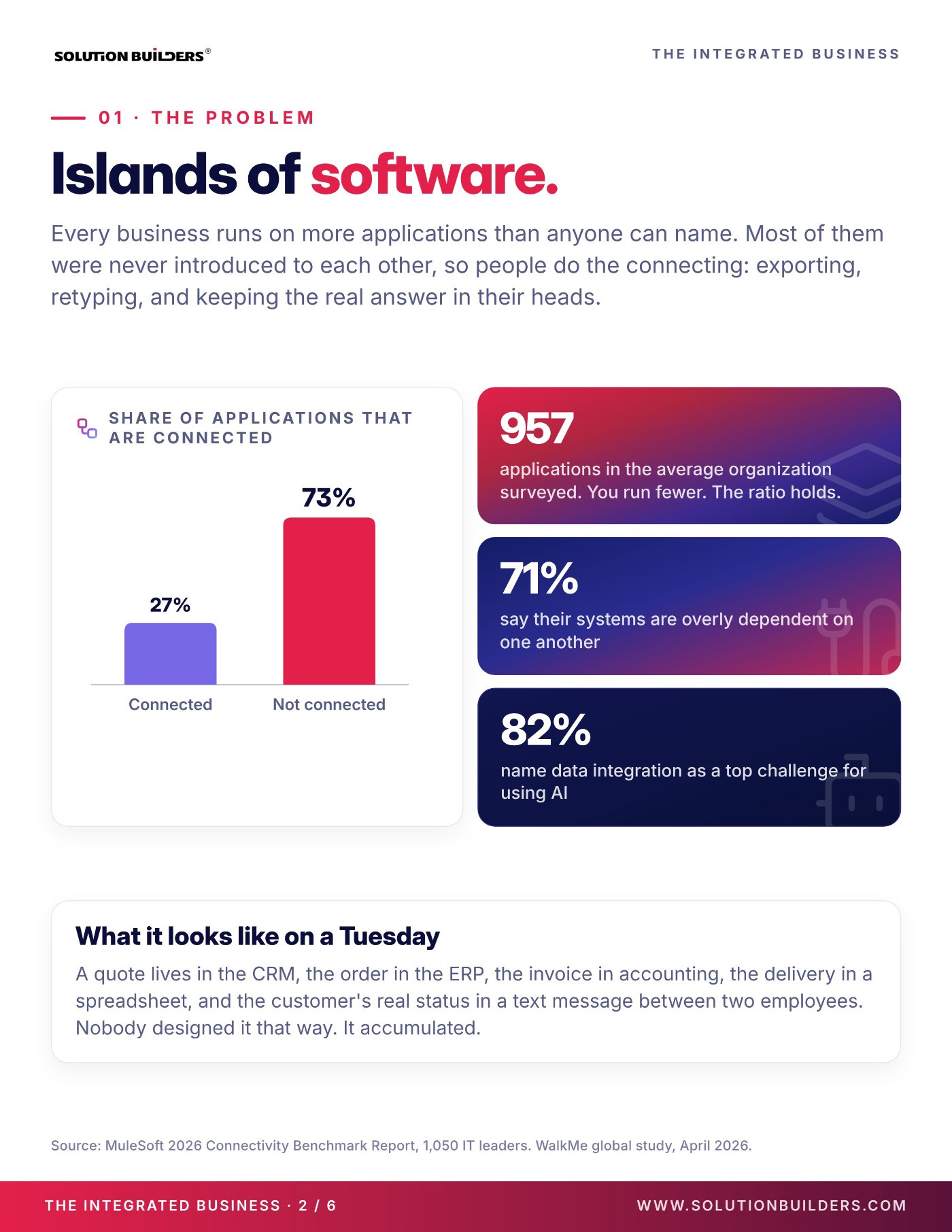
- MuleSoft found that only 27% of business applications are connected to each other. The other 73% are connected by a person with a spreadsheet.
- Integrated has three parts: infrastructure designed as one platform, integrations that move data without a human in the middle, and projects that finish.
- For most companies with 25 to 500 employees, Microsoft 365 is the natural hub. Identity, files, workflows and reporting all connect to it first.
- You do not integrate everything at once. Start with the bridge your people retype across most. The first five wins usually land inside 90 days.
Why business systems integration in Minneapolis starts with a Tuesday
Here is a Tuesday at a 120 person distributor off I-494. A quote lives in the CRM. The order lives in the ERP. The invoice lives in accounting. The delivery date lives in a spreadsheet, and the customer's real status lives in a text message between two employees. Nobody designed it that way. It accumulated, one helpful app at a time.
That is the starting point for most conversations about business systems integration in Minneapolis, and the numbers say the distributor is normal. The MuleSoft 2026 Connectivity Benchmark Report, a survey of 1,050 IT leaders, found that the average organization runs 957 applications and that only 27% of them are connected to each other. You run fewer apps than 957. The ratio holds.
Two more figures from the same report explain why this is suddenly urgent. 71% of IT leaders say their systems are overly dependent on one another, so one change breaks three things. And 82% name data integration as a top challenge for using AI. Copilot and every other AI tool can only reason over data it can reach. Islands of software are the reason the AI pilot stalled.
What data silos cost a company with 25 to 500 employees
Disconnected systems do not send an invoice. They collect their fee in small, daily amounts from the people who bridge the gaps. A WalkMe global study of 3,750 executives and employees, published in April 2026, found that workers lose 7.9 hours every week to digital frustrations. That is 51 working days a year, per person, and the figure rose 42% in a single year.
Some of that friction is slow laptops and forgotten passwords. A large share of it is the human bridge: the same order typed into two systems, the Monday report rebuilt from four exports, the question that can only be answered by the one person who knows. Those are the three tells that data silos are costing you more than you think.
| The tell | What it costs | The bridge to build |
|---|---|---|
| Someone exports a spreadsheet every week | Hours of rework, numbers nobody trusts | Reporting pulled from live systems |
| Someone retypes an order or an invoice | Errors, delays, duplicate records | A workflow that passes data without a person |
| Someone keeps the real answer in their head | Single point of failure, slow onboarding | One source of truth everyone can reach |
| A new hire waits days for the right access | Lost productivity, security gaps on exit | Identity driven onboarding and offboarding |
The IT team pays too. MuleSoft reports that 36% of IT time goes to building and fixing custom integrations, and that 26% of IT projects were delivered late last year. The two are related. The people who could finish the project are busy holding the bridges up. Integration is how a small IT team gets its calendar back.
Integrated means three parts working as one system
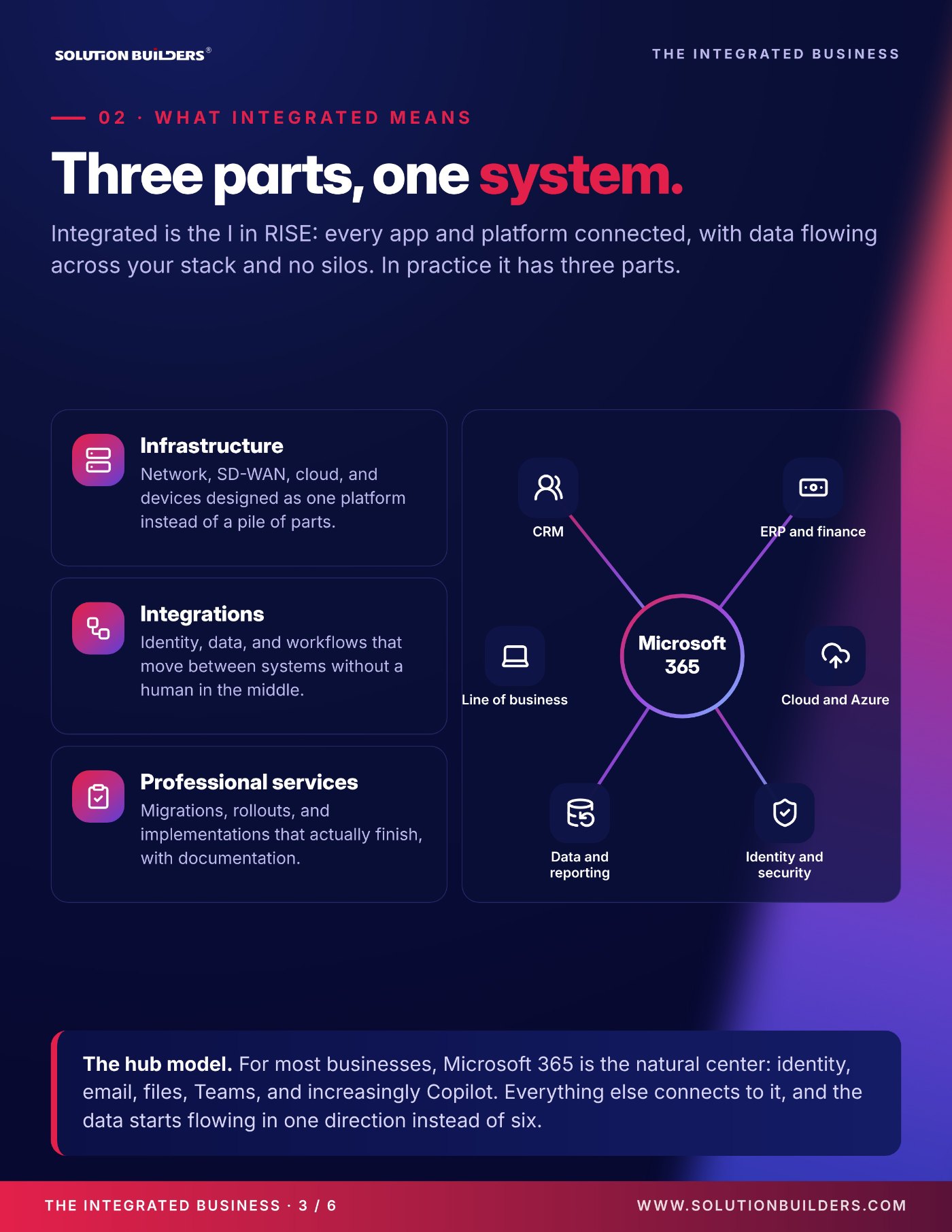
Integrated is the I in RISE, the four outcomes every Solution Builders engagement is built on. The plain definition: every app and platform connected, with data flowing across your stack and no silos. In practice it has three parts, and most companies have bought one of them and assumed they had all three.
- InfrastructureNetwork, SD-WAN, cloud and devices designed as one platform instead of a pile of parts. If the plant in Greater Minnesota and the office in the North Loop are on separate islands, nothing above them can connect either.
- IntegrationsIdentity, data and workflows that move between systems without a human in the middle. Single sign on, automated provisioning, connectors between the CRM and the ERP.
- Professional servicesMigrations, rollouts and implementations that actually finish, with documentation. An integration that lives in one engineer's head is a silo with extra steps.
Microsoft 365 is the natural center
For most businesses with 25 to 500 employees, Microsoft 365 is already the hub: identity, email, files, Teams, and increasingly Copilot. The CRM, the ERP and finance system, the line of business apps, Azure, reporting and security all connect to it, and data starts flowing in one direction instead of six.
That is why so much integration work begins as Microsoft 365 implementation done properly: tenant design, identity, governance and the connectors you already pay for. Get the hub right and every spoke gets easier.
Five ways to connect business applications that pay for themselves first
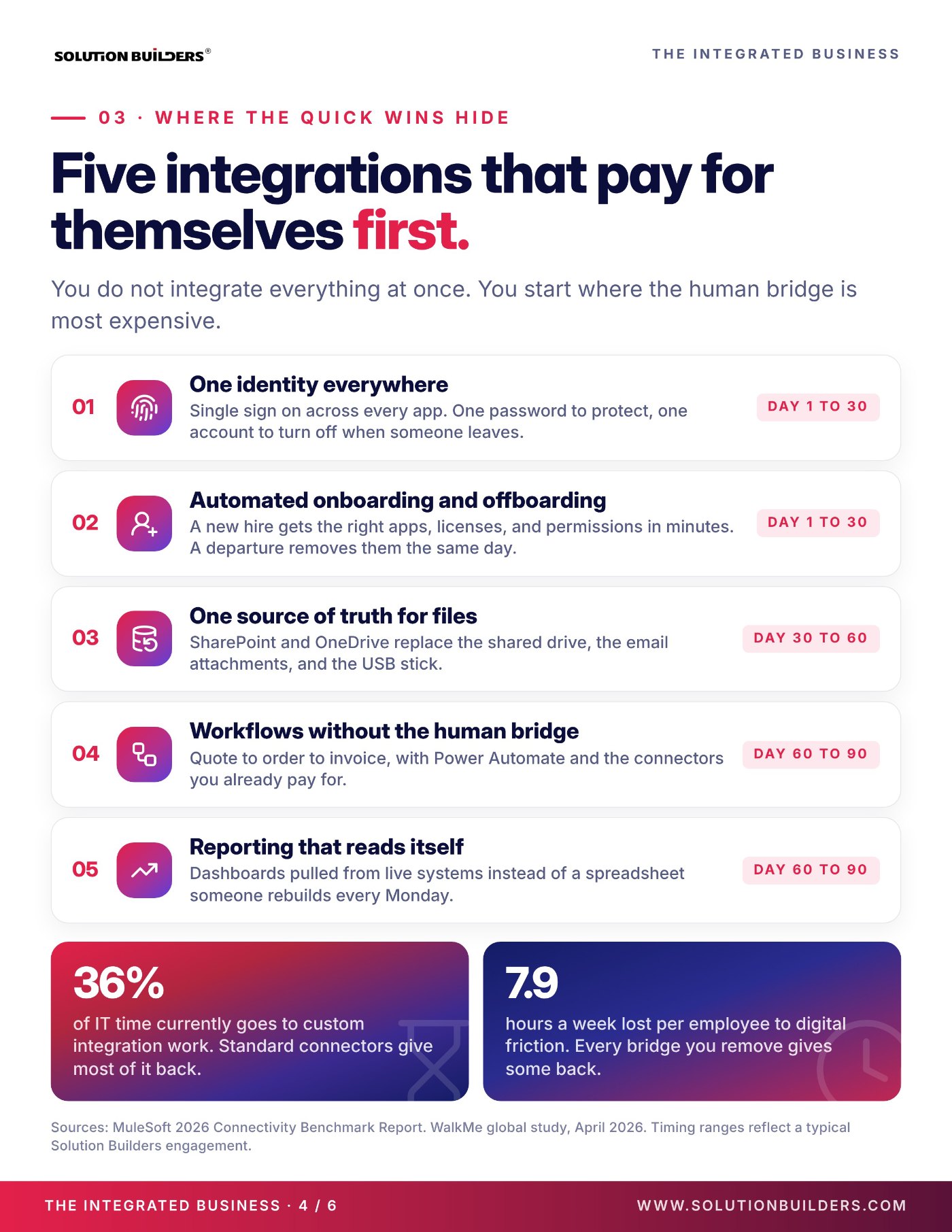
You do not integrate everything at once. You start where the human bridge is most expensive, and you pick wins that make the next win easier. These five are the usual order for a Twin Cities company, with the timing we see in a typical engagement.
- One identity everywhere (day 1 to 30)Single sign on across every app. One password to protect, one account to turn off when someone leaves. This is also the foundation for every security control that follows.
- Automated onboarding and offboarding (day 1 to 30)A new hire gets the right apps, licenses and permissions in minutes. A departure removes them the same day, not the next quarter.
- One source of truth for files (day 30 to 60)SharePoint and OneDrive replace the shared drive, the email attachments and the USB stick. Version control stops being a conversation.
- Workflows without the human bridge (day 60 to 90)Quote to order to invoice, built with Power Automate and the connectors already included in your licenses. The order is typed once.
- Reporting that reads itself (day 60 to 90)Dashboards pulled from live systems instead of a spreadsheet someone rebuilds every Monday morning.
Notice what is not on the list: a custom integration platform. MuleSoft's finding that 36% of IT time goes to custom integration work is the argument for standard connectors first. They give most of that time back, and WalkMe's 7.9 lost hours a week shrink with every bridge you remove.
Integration services for small business in Minnesota, delivered by engineers
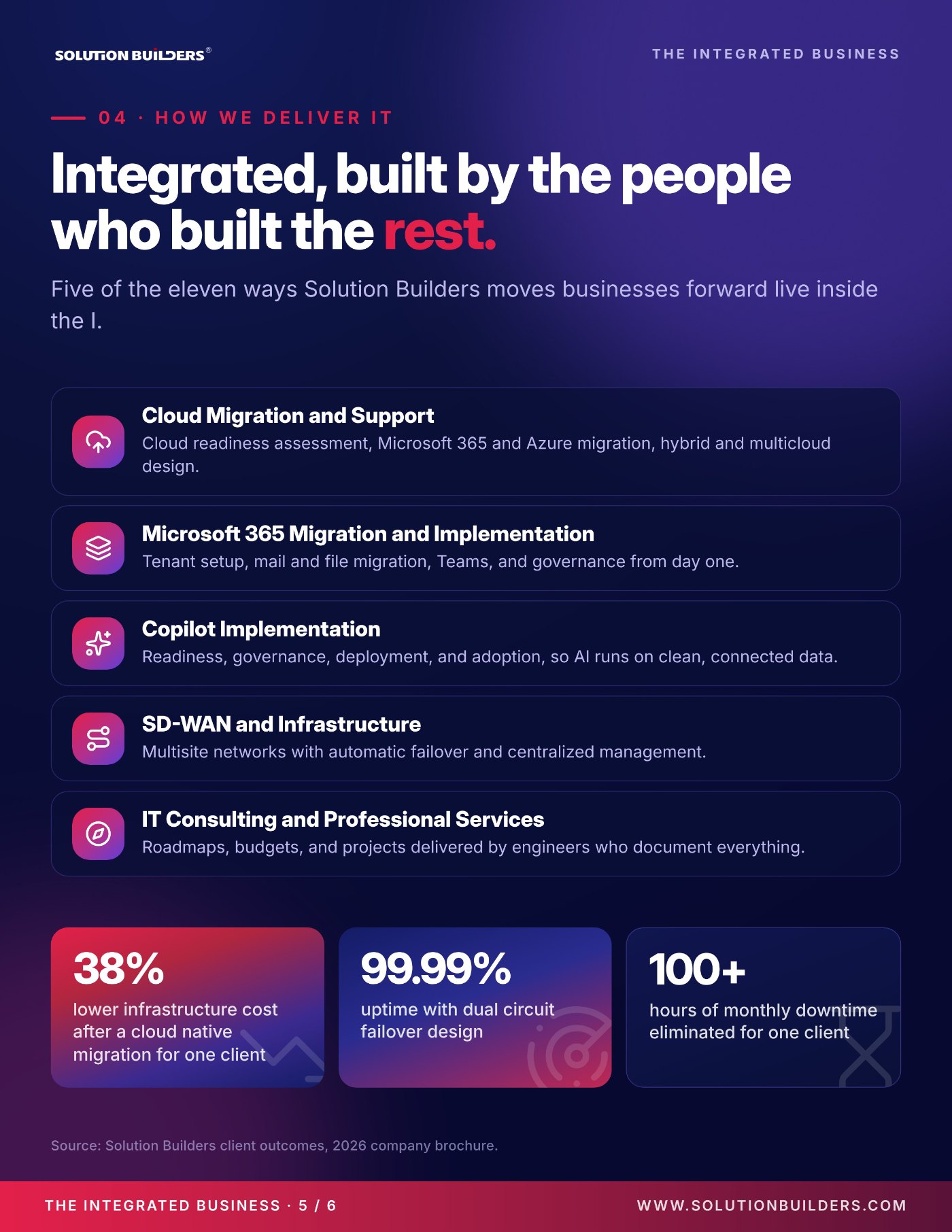
Integration services for a small business in Minnesota should not mean a six figure platform project. Five of the eleven ways Solution Builders moves businesses forward live inside the I: cloud migration and support, Microsoft 365 migration and implementation, Copilot implementation, SD-WAN and infrastructure, and IT consulting and professional services. Different names on the proposal, one system in the end.
Bought one app at a time
- Each vendor owns its own logins and data
- Projects start, stall, and restart with new staff
- Reports built by hand, trusted by nobody
- AI pilots stall on data it cannot reach
Designed as one platform
- One identity, one hub, data flowing one direction
- Projects scoped, finished and documented
- Dashboards from live systems
- Copilot runs on clean, connected data
Two of those numbers are integration stories. The architecture firm needed file collaboration to work across offices the way it worked in one building, and got it by moving to a Microsoft 365 and Azure environment with zero on premises footprint. The manufacturer had a flat network, aging infrastructure and an overwhelmed one person IT team, and the fix was infrastructure, cloud and support designed together. The professional services team delivers the projects, and a virtual CIO keeps the roadmap honest.
What to do next: start with one bridge
The biggest mistake in integration projects is scope. Pick one bridge, finish it, and let the result argue for the next one. Here is how to find yours this week.
- Ask three people in operations which number they retype most often, and into which two systems.
- Count the spreadsheets that get rebuilt every week and who builds them.
- List the questions only one employee can answer.
- Check how long a new hire waited for access last time, and how long a departure kept it.
- Ask IT how much of last month went to fixing a custom integration.
- Rank the bridges by hoursHours per week times the people doing it. The top of that list is your first project.
- Check the hubIf identity, files and Teams are not settled in Microsoft 365, that is the real first project, because every bridge rests on it.
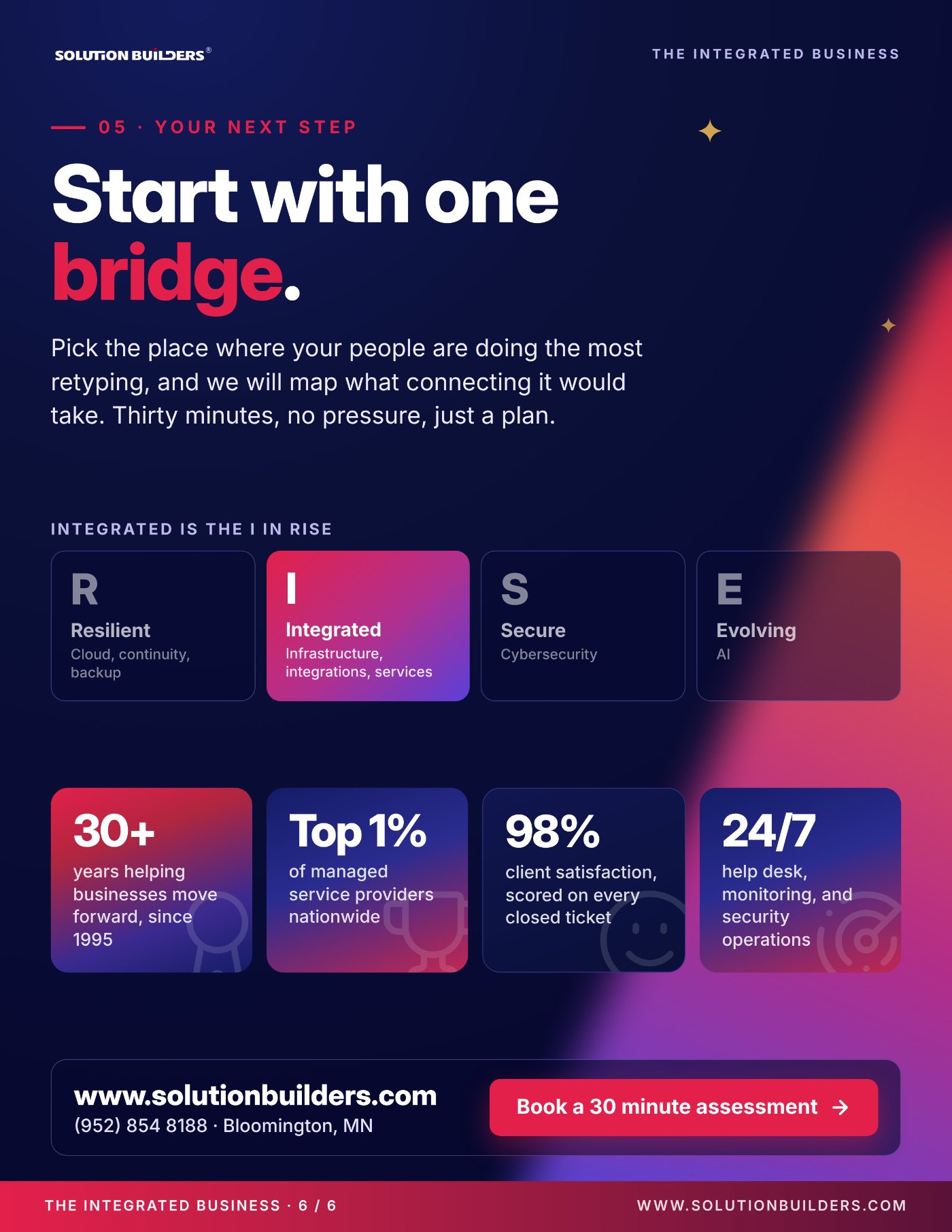
- Get it mappedTell Solution Builders where your people are retyping the most and we will map what connecting it would take. Thirty minutes, no pressure, just a plan.
For the full story behind the I, including how infrastructure, integrations and professional services fit the other three outcomes, read RISE: Integrated.
Business systems integration for Twin Cities companies
From our Bloomington headquarters, Solution Builders has connected the systems of Minnesota businesses since 1995. Our 50+ engineers design infrastructure, integrations and projects as one platform for companies with 25 to 500 employees across Minneapolis, St. Paul and the metro, from distributors on the I-494 corridor to firms with a plant in Greater Minnesota and an office downtown. Related services: Professional Services, Microsoft 365, IT Consulting, Cloud Migration. Contact us or book a 30 minute call.