Solution Builders team
Jump to a section
- Three offices had grown three server rooms, three file structures and three backup systems, with a six figure refresh quote due within a year.
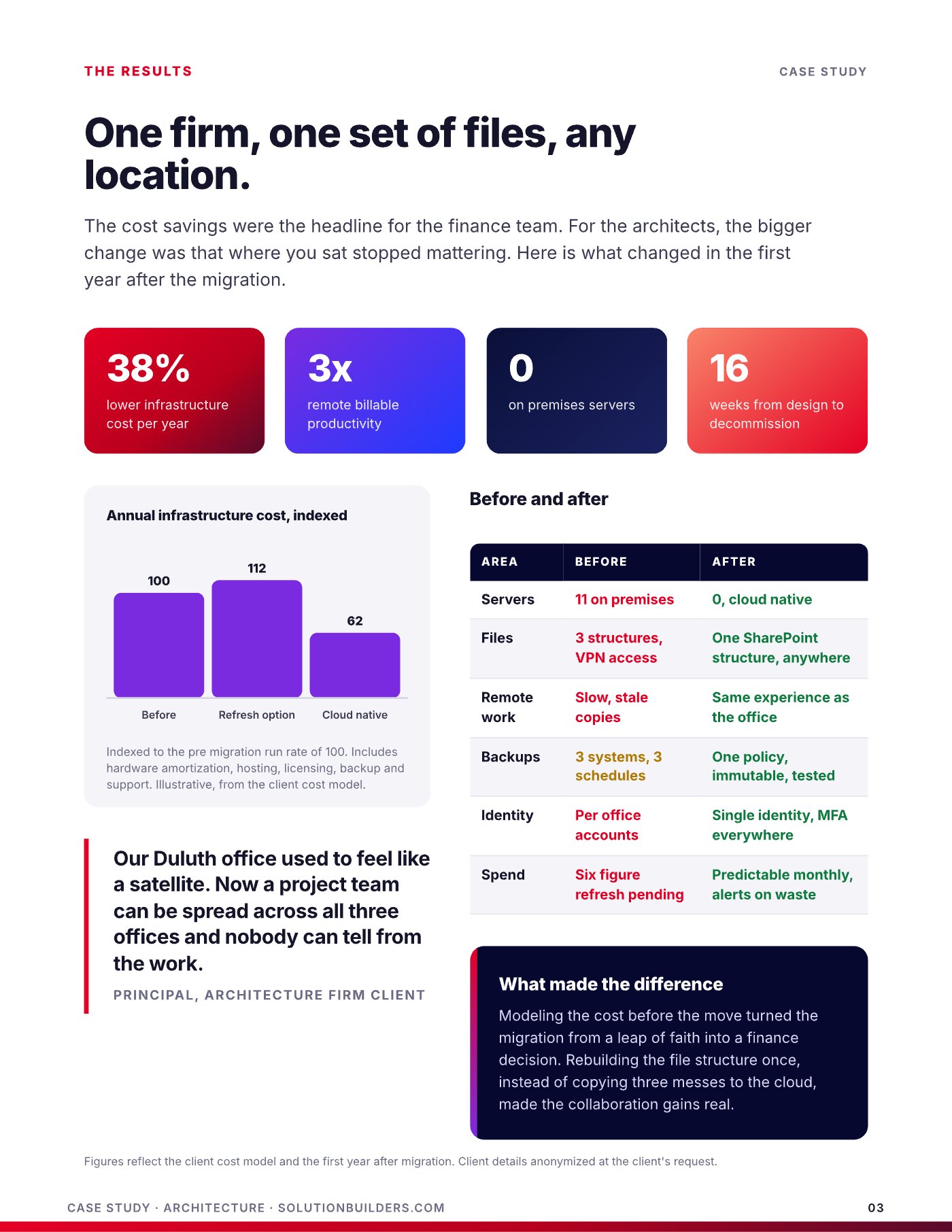
- Modeling five year cost before the move made the migration a finance decision: refresh at 112, cloud native at 62, indexed to today at 100.
- Four waves in sixteen weeks, office by office on weekends, with identity first and servers decommissioned last. No lost workdays.
- Results in year one: 38% lower infrastructure cost, 3x remote billable productivity, zero on premises servers and one file structure for every project.
Three offices, three sets of files, one frustrated team
Architecture and engineering firms in Minneapolis have a particular pain. Design files are enormous, project teams are spread across offices and job sites, and the VPN that was fine for email crawls the moment someone opens a model from home. Cloud migration for architecture firms in the Twin Cities is less about retiring hardware than about making where you sit stop mattering. That was the goal for this firm, a 60 user architecture and design practice with three offices, including one in Duluth, and field staff on sites across the region.
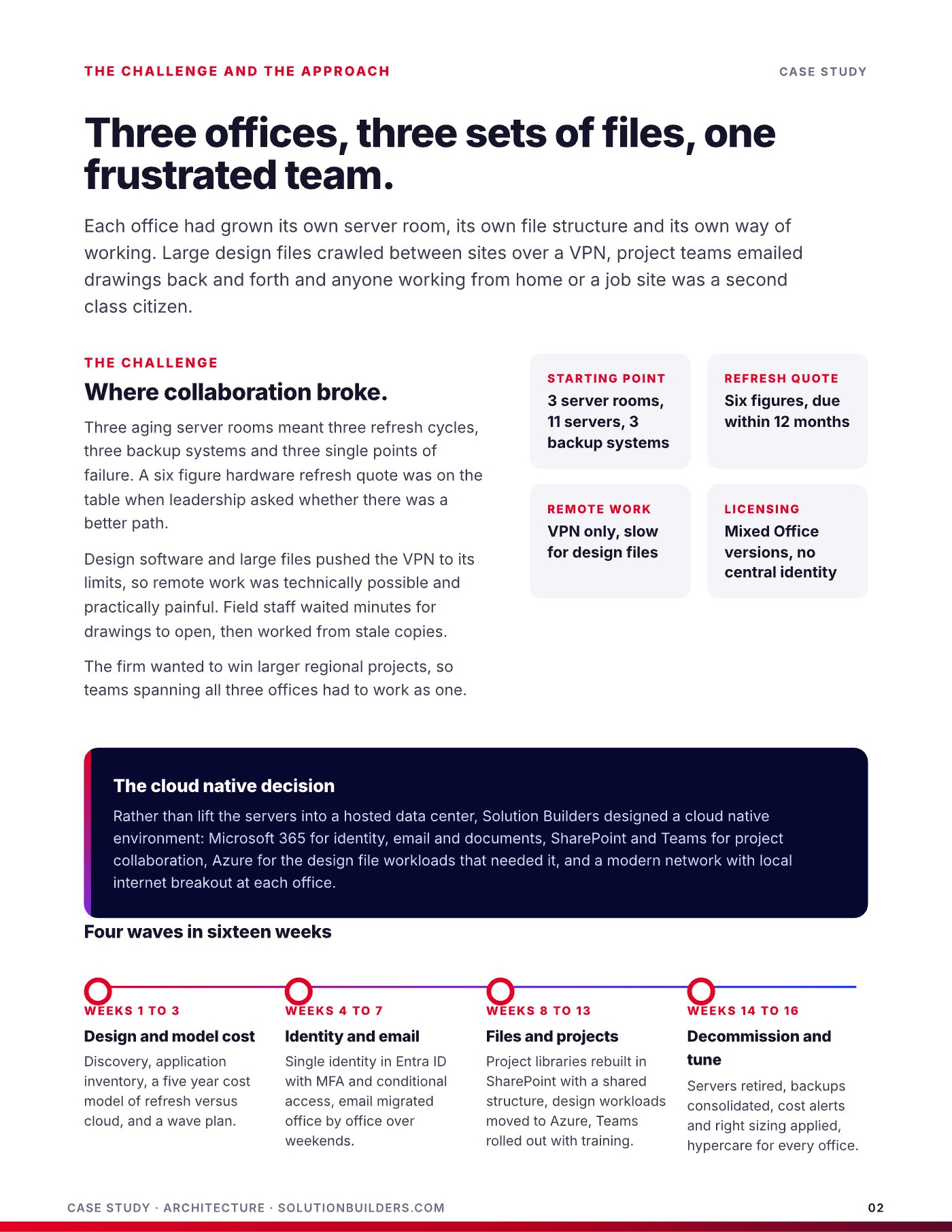
Each office had grown its own server room, its own file structure and its own way of working. Here is where the firm stood when leadership asked whether there was a better path.
- Infrastructure. Three server rooms, eleven servers and three separate backup systems on three schedules.
- Refresh quote. Six figures, due within twelve months, just to keep the same setup running.
- Remote work. VPN only, slow for design files, so field staff worked from stale copies.
- Licensing and identity. Mixed Office versions and per office accounts, with no central identity.
Where collaboration broke, and what the refresh quote revealed
Three aging server rooms meant three refresh cycles, three backup systems and three single points of failure. Large design files crawled between sites over the VPN, project teams emailed drawings back and forth, and anyone working from home or a job site was a second class citizen.
The business problem was bigger than the IT problem. The firm wanted to win larger regional projects, which meant teams spanning all three offices had to work as one. A six figure hardware refresh would have bought another five years of the same friction. When leadership asked for a better path, the first step was not a migration plan. It was a five year cost model comparing refresh against cloud.
Rebuild in the cloud, do not lift the mess into it
Rather than lift the servers into a hosted data center, Solution Builders designed a cloud native environment: Microsoft 365 for identity, email and documents, SharePoint and Teams for project collaboration, Azure for the design file workloads that needed it, and a modern network with local internet breakout at each office.
That distinction is the one most firms miss. Lifting eleven servers into someone else's data center keeps eleven servers' worth of cost and three file structures' worth of confusion. A cloud native migration rebuilds once, on platforms the firm already licensed.
What changed: four waves in sixteen weeks
The migration ran in four waves, office by office, with every cutover on a weekend and hypercare the following week. Identity went first because everything else depends on it. Servers went last because nothing should be turned off until its replacement has carried real work.
- Weeks 1 to 3: design and model costDiscovery, application inventory, a five year cost model of refresh versus cloud, and a wave plan.
- Weeks 4 to 7: identity and emailA single identity in Entra ID with multifactor authentication and conditional access, then email migrated to Microsoft 365 office by office over weekends.
- Weeks 8 to 13: files and projectsProject libraries rebuilt in SharePoint with one shared structure instead of three, design workloads moved to Azure, Teams rolled out with training for every office.
- Weeks 14 to 16: decommission and tuneServers retired, backups consolidated into one immutable policy, cost alerts and right-sizing applied, hypercare for every office.
Security was built in from the first wave rather than added at the end. MFA, conditional access and managed detection from the Solution Builders security operations center were live before the first file moved, so the firm's client data was better protected in week four than it had been in year ten of the old server rooms.
One firm, one set of files, any location
The cost savings were the headline for the finance team. The client cost model, indexed to the old run rate of 100, put the refresh option at 112 and the cloud native environment at 62, including hardware amortization, hosting, licensing, backup and support. For the architects, the bigger change was that where you sat stopped mattering.
| Area | Before | After |
|---|---|---|
| Servers | 11 on premises | 0, cloud native |
| Files | 3 structures, VPN access | One SharePoint structure, anywhere |
| Remote work | Slow, stale copies | Same experience as the office |
| Backups | 3 systems, 3 schedules | One policy, immutable, tested |
| Identity | Per office accounts | Single identity, MFA everywhere |
| Spend | Six figure refresh pending | Predictable monthly, alerts on waste |
Our Duluth office used to feel like a satellite. Now a project team can be spread across all three offices and nobody can tell from the work.Principal, Solution Builders architecture firm client
Remote billable productivity tripled in the first year, measured in hours logged from home and from job sites, because a drawing now opens as fast in a truck outside Rochester as it does at a desk in the North Loop.
Microsoft 365 and Azure for AEC firms: four lessons from the migration
Architecture, engineering and construction firms across the Twin Cities face the same refresh quote sooner or later. Four lessons from this engagement travel well.
- Model the cost before you move. A five year comparison of refresh versus cloud turns a leap of faith into a finance decision the partners can defend.
- Rebuild the file structure once. Copying three messes to the cloud gives you three messes in the cloud. One SharePoint structure is where the collaboration gains come from.
- Identity first, servers last. Single sign on with MFA makes every later wave easier, and nothing gets turned off until its replacement has carried real work.
- Put design workloads where they belong. Email and documents in Microsoft 365, heavy design files in Azure, with local internet breakout so each office goes straight to the cloud.
Same servers, new address
- Eleven servers' worth of hosting cost
- Three file structures, now remote
- VPN still in the way of design files
Rebuilt once, on platforms you own
- Zero servers, 38% lower cost
- One structure, any location
- Security built in from wave one
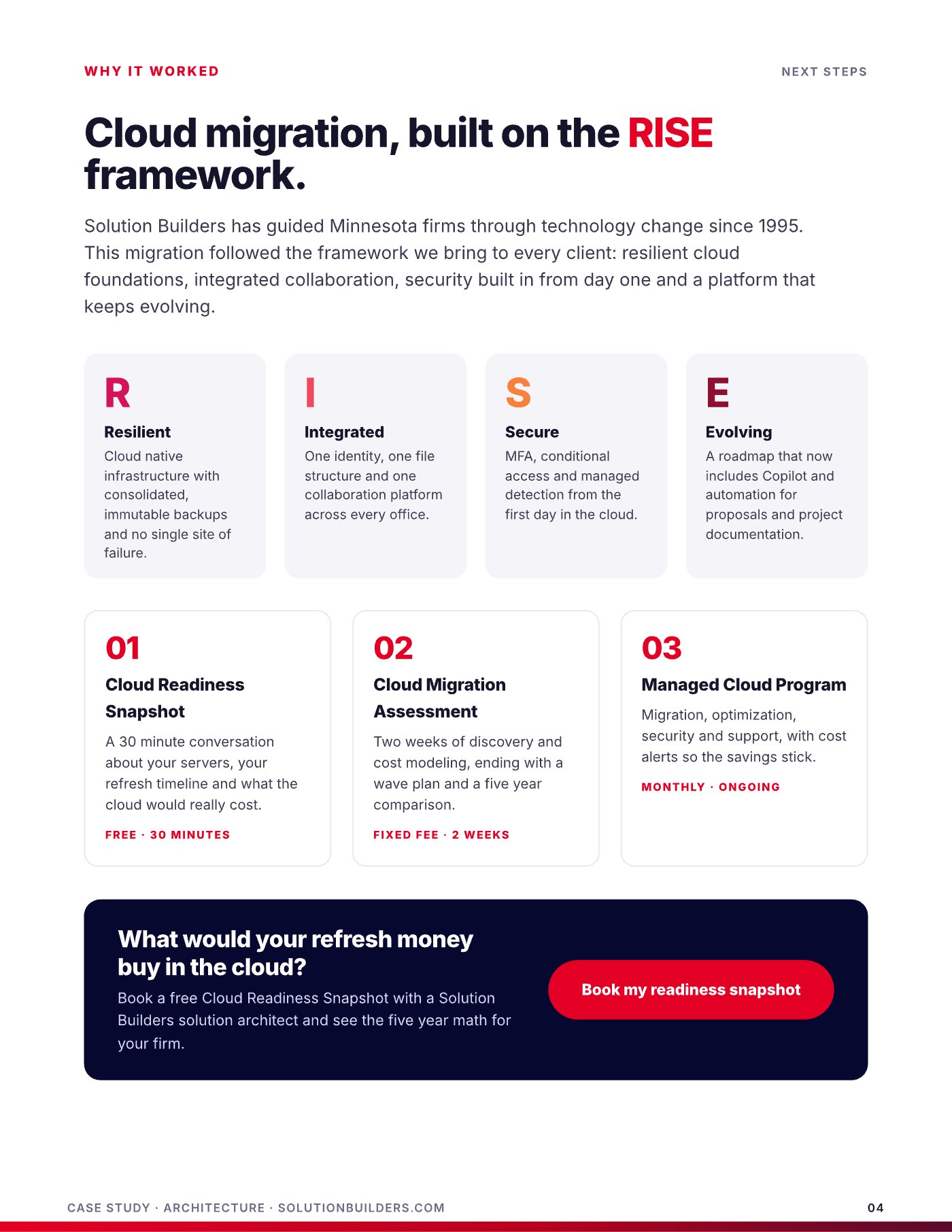
This migration followed the RISE framework: resilient cloud foundations, integrated collaboration, security from day one and a roadmap that now includes Copilot for proposals and project documentation.
Before you sign the refresh quote: cloud migration for Twin Cities architects
If a hardware quote is sitting on your desk, do these five things before you sign it.
- List every server and what actually runs on it. Most firms find half of them exist out of habit.
- Count the file structures. If each office has its own, you have a collaboration problem, not a storage problem.
- Ask field staff how long a drawing takes to open from a job site. Time it.
- Build a five year cost model: refresh versus cloud native, including licensing, backup and support.
- Book a free 30 minute Cloud Readiness Snapshot with Solution Builders and see the five year math for your firm.
Solution Builders has provided IT support for architects and engineers in Minneapolis, St. Paul and Greater Minnesota since 1995 from Bloomington, with 50+ engineers, a 24/7 security operations center and month to month terms. Firms with 25 to 500 people get the same cost model, the same wave plan and the same cost alerts that kept this firm's savings from drifting after year one.
Cloud migration for architecture and engineering firms in the Twin Cities
Solution Builders migrates architecture, engineering and design firms with 25 to 500 people from Bloomington, including practices in the North Loop and downtown Minneapolis, St. Paul studios and firms with an office in Greater Minnesota. The client in this story is anonymized at its request, and its wave plan is the one we bring to every firm. Related services: Cloud Migration, Microsoft 365, Cybersecurity, Microsoft Copilot. Contact us or book a 30 minute call.