Solution Builders team
Jump to a section
- No single tool saves you. Six layers do: identity, endpoints, email and people, patching, backups, and 24/7 monitoring and response.
- Modern multifactor authentication blocks more than 99% of unauthorized sign in attempts, and a year of training cuts risky clicks 87%.
- Security AI and automation lower breach cost by $1.93 million and shorten containment by 65 days, according to IBM.
- A real engagement moves in 90 days: assess, harden, watch and train, then test and report, with results on one page.
Why no single tool saves you, and layers do
Here is the frustrating part. Part 1 showed record losses, $4.99 million breaches and attackers using AI. Part 2 showed that most of the ways companies respond do not hold. An owner in Bloomington who has already bought the firewall, the antivirus and the insurance could be forgiven for asking what, exactly, is left to buy.
The answer is not a product. It is a structure. Every attack in Part 1 had to get past a point: a password, a device, a person, an unpatched server, a backup, or a quiet weekend with nobody watching. Put a control at each point and an attacker has to beat all six. You only need one to hold. That is the idea behind managed detection and response, and why the companies in Minneapolis and St. Paul that run it well have incidents instead of outages.
Secure is the S in our RISE framework, built into every engagement with our cybersecurity team in Bloomington rather than sold as an add on. These six layers are the ones we run across the Twin Cities.
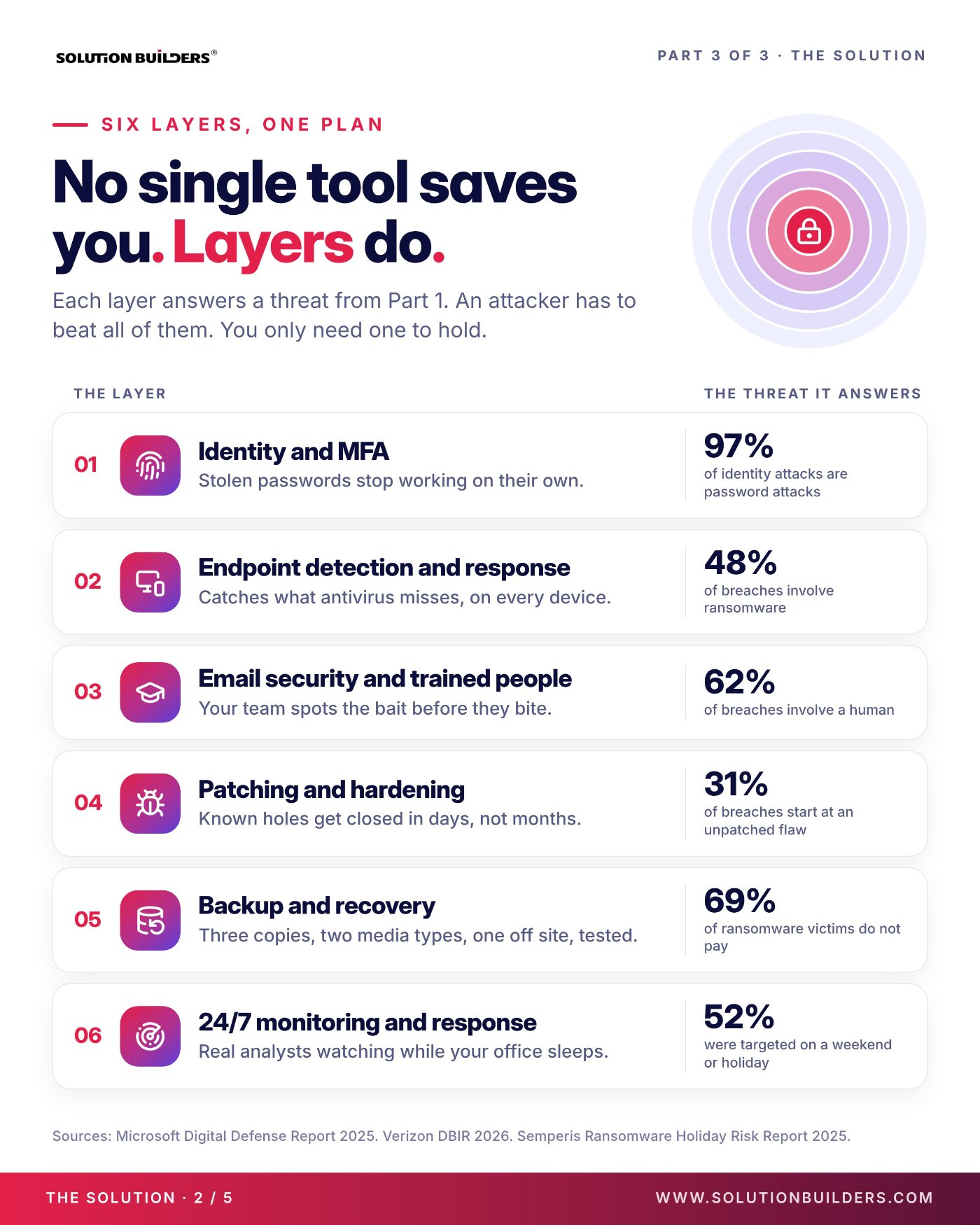
The six layers of defense and the threat each one answers
Each layer answers a number from the 2026 breach reports.
| Layer | What it does | The threat it answers |
|---|---|---|
| 1. Identity and MFA | Stolen passwords stop working on their own | 97% of identity attacks are password attacks (Microsoft) |
| 2. Endpoint detection and response | Catches what antivirus misses, on every device | 48% of breaches involve ransomware (Verizon) |
| 3. Email security and trained people | Your team spots the bait before they bite | 62% of breaches involve a human (Verizon) |
| 4. Patching and hardening | Known holes get closed in days, not months | 31% of breaches start at an unpatched flaw (Verizon) |
| 5. Backup and recovery | Three copies, two media types, one off site, tested | 69% of ransomware victims do not pay (Verizon) |
| 6. 24/7 monitoring and response | Real analysts watching while your office sleeps | 52% were hit on a weekend or holiday (Semperis) |
Four of the six are the cybersecurity basics that work: MFA, patching, backups and trained people. None is exotic. Most of the identity layer lives inside Microsoft 365, configured properly: MFA enforced for everyone, conditional access that blocks sign ins from places your people never are, and legacy protocols that bypass MFA turned off. The endpoint and monitoring layers are where a partner earns its fee, because they need a platform and people watching it.
Cybersecurity basics that work: MFA, training, patching and backups, with proof
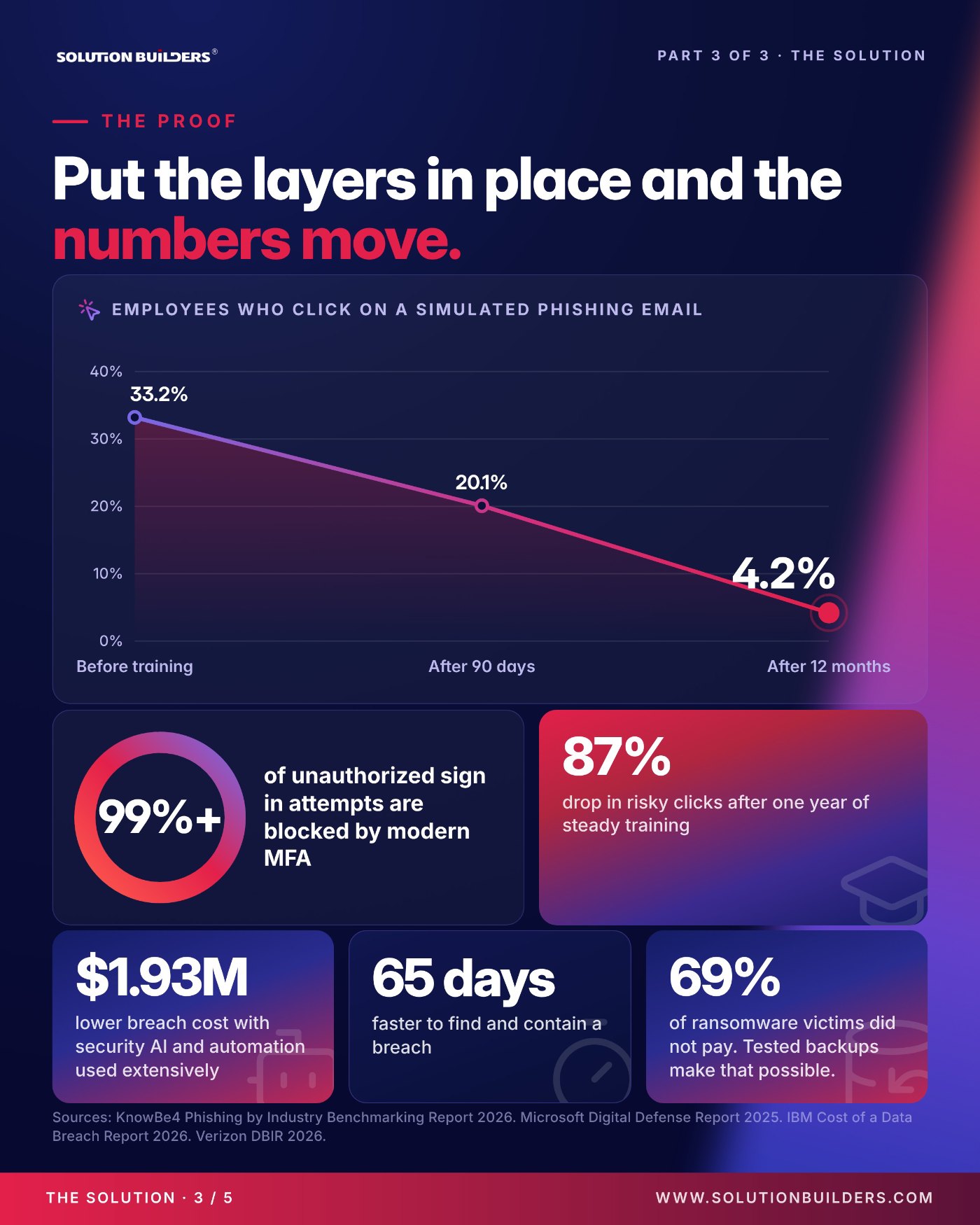
Put the layers in place and the numbers move. These are the figures we show leadership teams when someone asks whether training or MFA is worth the friction.
- Training works, and keeps working. KnowBe4's Phishing by Industry Benchmarking Report 2026 tracked employees who click a simulated phishing email: 33.2% before training, 20.1% after 90 days, 4.2% after 12 months. An 87% drop from short, steady sessions, not an annual lecture.
- MFA closes the front door. Microsoft's Digital Defense Report 2025 found modern multifactor authentication blocks more than 99% of unauthorized sign in attempts, and that 97% of identity attacks are password attacks.
- Tested backups make the ransom optional. Verizon found 69% of ransomware victims did not pay. The ones who could say no had a clean, recent copy of their data where the attacker could not reach it.
That last point is where companies in Minnesota most often surprise themselves. The backup job reports green every night, then a restore attempt finds the copy is three weeks old or on the same network the ransomware just encrypted. Our backup and disaster recovery team restores something for every client on a schedule, times it and writes the number down.
A backup you have never restored is a theory. Test it before an attacker does.Solution Builders backup and disaster recovery team
24/7 security monitoring in Minnesota: what managed detection and response does
Layer six makes the other five work after 5 p.m. Managed detection and response, or MDR, means a security operations center staffed around the clock, watching your devices, identities, email and cloud, investigating anything odd and acting in minutes. Not a dashboard somebody checks on Monday. People, awake, with the authority to revoke a session at 2 a.m.
Attackers know when offices are empty: Semperis found 52% of ransomware hits land on a weekend or holiday. Here is the layer at work for a Solution Builders client, a 42 user accounting firm in the metro.
- Minute 0: a credential is phishedAn employee types a password into a convincing fake Microsoft login page. The attacker signs in from an unfamiliar location.
- Minutes 2 to 4: the platform flags itIdentity monitoring spots the unusual sign in and ties it to a new mailbox rule the attacker just created.
- Minute 9: an analyst actsOur security operations center revokes the session, resets the credential and isolates the device.
- Minute 22: containedZero ransom paid, full restoration overnight from tested backups, fully operational by Monday.
Twenty two minutes against an industry average of 247 days. That gap is the value of managed detection and response from Solution Builders in Minneapolis, and why we run our own 24/7 SOC in Bloomington rather than reselling someone else's.
Your first 90 days with a security partner
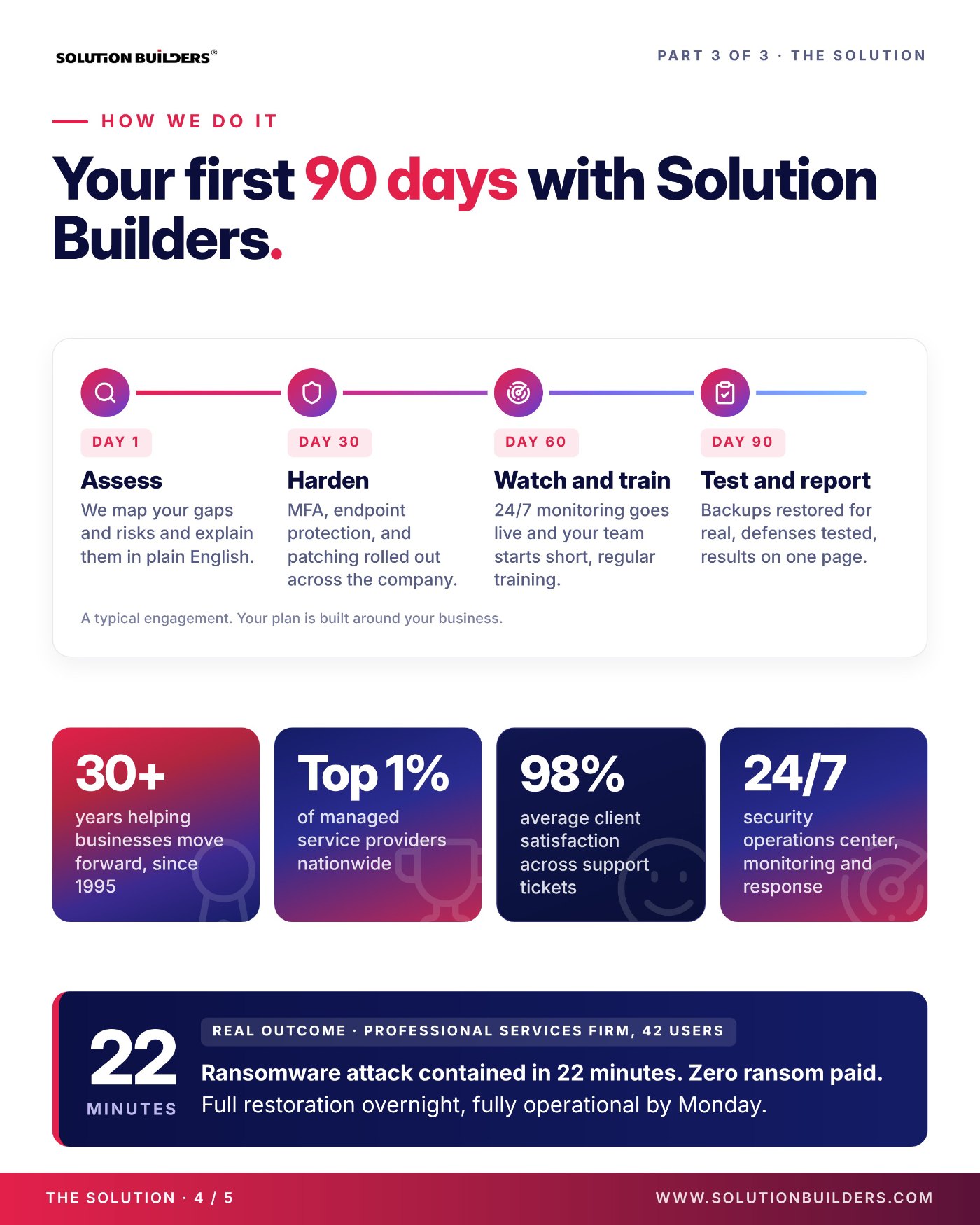
Six layers sound like a long project. In practice a managed engagement moves in four steps over 90 days, with measurable improvements inside the first month. This is a typical plan. Yours gets built around your business and what your team already has.
| Milestone | What happens | What you get |
|---|---|---|
| Day 1: Assess | We map your gaps and risks across all six layers | A plain English report |
| Day 30: Harden | MFA, endpoint protection and patching rolled out company wide | The two biggest doors closed |
| Day 60: Watch and train | 24/7 monitoring goes live, short regular training starts | Somebody awake, people who spot bait |
| Day 90: Test and report | Backups restored for real, defenses tested | Results on one page for leadership |
For a head start, the 30 day checklist in The SMB Cyber Resilience Playbook covers the identity and endpoint items a company can do on its own with licenses it already has.
Thirty years, one SOC, month to month
Solution Builders started in Bloomington in 1995. We are in the top 1% of managed service providers nationwide, a 2026 MSP 501 winner and SOC 2 Type II audited, with 50+ engineers, a 24/7 security operations center and 98% client satisfaction scored on every ticket. Terms are month to month.
What to do next, starting this week
You can start on four of the six layers before you talk to anyone. Do these in order.
- Turn on multifactor authentication for every account, including email, VPN and remote access, and disable the legacy protocols that bypass it.
- Ask for the patch report: days from a critical patch being released to being installed everywhere.
- Restore one server and one mailbox from backup this month. Time it. If it fails, you have found your first project.
- Schedule a 15 minute phishing training session for the whole company, then repeat it monthly.
- Answer the question from Part 2: if ransomware hit at 2 a.m. on Saturday, who would know? If nobody, that is layer six.
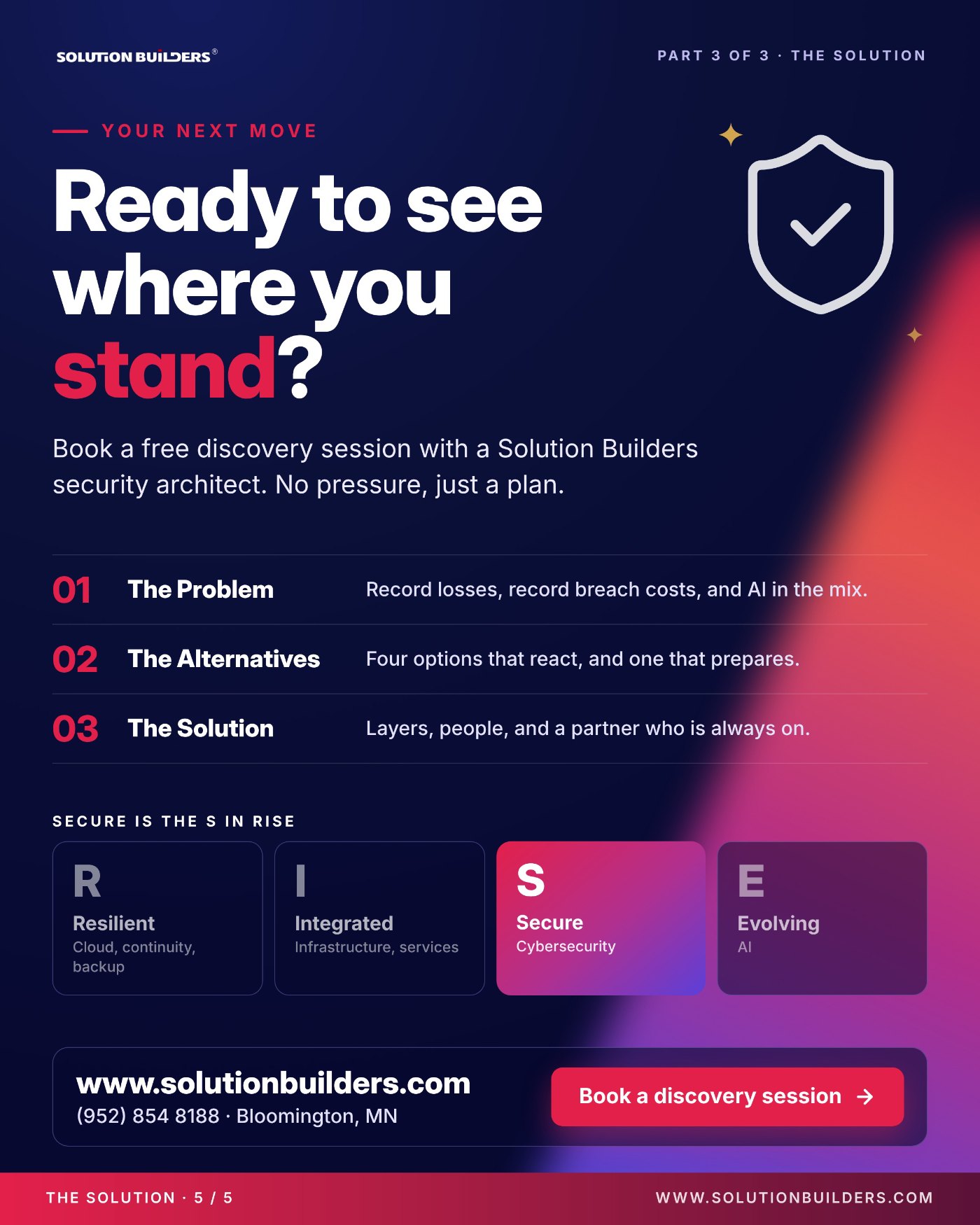
- Book a free discovery session with a Solution Builders security architect to see where you stand across all six layers. No pressure, just a plan.
That wraps the series: record losses with AI in the mix, four options that react and one that prepares, and six layers run by people who are always on. Secure is the S in RISE for a reason.
Managed detection and response for Twin Cities companies
Solution Builders runs its own 24/7 security operations center from Bloomington, next door to the Mall of America, for companies with 25 to 500 employees across Minneapolis, St. Paul and all of Minnesota. Our 50+ engineers, SOC 2 Type II audited practice and 98% client satisfaction score back every layer described here, from manufacturers on the I-494 corridor to firms downtown. Related services: Cybersecurity, Data Backup and Disaster Recovery, Microsoft 365. Contact us or book a 30 minute call.